9 Best External SSDs for Photo Storage (November 2026)
The best external SSDs for photo storage include the SSK Portable SSD 250GB External Solid State for most photographers, the Crucial X10 Pro 1TB Portable SSD for field and travel, and the SSK 128GB Portable SSD External Hard Drive for small travel kits.
On this page (8 sections)
- Best external SSDs for photo storage compared
- How we compared these photo storage SSDs
- Which speed do you need for photo storage?
- How much capacity should a photo SSD have?
- Does USB-C or USB-A matter for photo storage?
- How tough does a photo SSD need to be?
- Is hardware encryption worth it for photo storage?
- Verdict: which external SSD should you buy for photos?
The best external SSD for photo storage is the SSK Portable SSD 250GB External Solid State, a 36.6 g aluminum drive with 1050MB/s reads and SLC caching that keeps long RAW transfers steady. For field work in dust or rain, choose the Crucial X10 Pro 1TB.
For a drive you will hammer for years, the Samsung T9 1TB is the safer long-term pick.
Photo storage is a speed and safety problem before it is a size problem. Culling a card of RAW files means reading hundreds of large images quickly, and a drive that slows down halfway through makes the job drag.
An SSD with steady write speeds and low heat handles that better than a spinning hard drive.
Capacity decides the rest. A 250GB drive is plenty for a personal library and a few shoots at a time.
Multi-day jobs and video next to your photos push you toward 1TB. The picks below sort by what each drive does best for a photographer.
Our picks at a glance
-
1
 Best for most photographers
SSK Portable SSD 250GB External Solid State
9.7/10 our score
See it on Amazon -
2

-
3
 Best for small travel kits
SSK 128GB Portable SSD External Hard Drive
9.1/10 our score
See it on Amazon
- 4
 Check it
Lexar D70E 512GB Dual Drive External SSD
Best for phone photo backup - 5
 Check it
SABRENT 1TB Rocket Nano V2 External SSD
Best for 8K video and big files - 6
 Best for long-term heavy useCheck it
- 7
 Check it
OSCOO 1TB Touchscreen Encrypted External SSD Hard
Best for client photo security - 8
 Best for slim everyday carryCheck it
- 9
 Check it
GARMESE 1TB External SSD Up to 2000MB/s
Best for low-cost 1TB storage
Best external SSDs for photo storage compared
The SSK 250GB wins on speed and weight for most people, while the Crucial X10 Pro and Samsung T9 win when toughness or long-term heat control matter more. Every pick here reads fast enough for RAW culling and edits.
SSK Portable SSD 250GB External Solid State: Best for most photographers
- Up to 1050MB/s read and 1000MB/s write
- Aluminum case, 36.6 g
- SLC caching for steady transfers
- USB-C and USB-A cables
A light aluminum SSD that keeps large photo transfers steady and runs cool enough to carry all day.
Pros
- Fast 1050MB/s reads
- SLC caching for long transfers
- Very light at 36.6 g
- Low heat and low power draw
Cons
- Smallest capacity in this group
- Windows shows about 232GB
The SSK 250GB suits the photographer who carries one drive for the week's shoots and edits from it. Its 1050MB/s reads load RAW files and previews quickly, and SLC caching keeps transfers inside the cache steady instead of stalling partway through a card dump.
That cache is about 25% of free capacity, so plan for speed to taper as the drive fills. The aluminum case peaks around 105.58 F, which helps when the drive sits next to a warm laptop.
At 36.6 g it slips into a jacket pocket without notice.
Windows shows it as about 232GB because of binary counting; the physical storage is 250GB. It ships in exFAT for plug-and-play on Mac and Windows.
For more on this format, see our roundup of the best external SSDs for everyday use.
Buy it if you want the lightest, fastest everyday photo drive without spending much. Skip it if a single library needs more than 250GB in one place.
Crucial X10 Pro 1TB Portable SSD: Best for field and travel
- Up to 2100MB/s read and 2000MB/s write
- IP55 dust and water resistance
- Drop resistant to 7.5 ft
- USB-C and USB-A
A tough 1TB drive with weather sealing for shoots away from a desk.
Pros
- Fast 2100MB/s reads
- IP55 water and dust resistance
- Drop protection to 7.5 ft
- Slim 42 g body
Cons
- Premium price tier
- Top speed needs a 20Gbps USB port
The Crucial X10 Pro 1TB suits photographers who shoot outdoors and cannot baby their gear. Crucial rates it IP55 for dust and water and drop resistant to 7.5 ft, so a wet beach shoot or a bag knocked off a table is less of a disaster.
Its 2100MB/s reads and 2000MB/s writes are the fastest here. In practice that means a full memory card of RAW files copies in seconds, and editing straight from the drive feels close to working on internal storage.
The anodized aluminum body weighs 42 g.
The trade-off is the premium price tier and the port. Full speed needs a USB 3.2 Gen 2x2 connection.
It comes with USB-C and USB-A so it works with older laptops too. If your camera phone records ProRes, the best external SSDs for iPhone covers which drives handle it.
Buy it for shoots where weather and knocks are part of the job. Skip it if your laptop only has standard USB-C and you want the top speed.
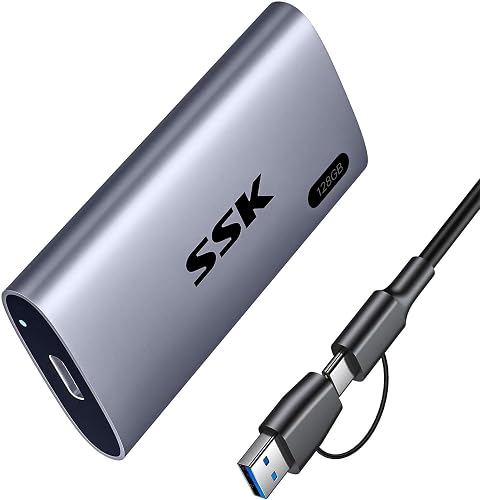
SSK 128GB Portable SSD External Hard Drive: Best for small travel kits
- Up to 550MB/s
- USB-C cable and USB-A adapter
- Aluminum case
- SLC caching
A tiny, inexpensive drive for moving a shoot's selects without much bulk.
Pros
- Very affordable
- Light and pocketable
- USB-C and USB-A in the box
- Good for quick offloads
Cons
- 550MB/s is the slowest here
- 128GB fills fast with RAW files
The SSK 128GB is the pick for a minimal travel kit. It weighs next to nothing and costs very little, so you can leave one in every camera bag without thinking about it.
550MB/s reads are fast enough for JPEG culling and moving a day's selects.
The drive ships with a USB-C cable and a USB-A adapter and uses SLC caching to hold speed during short transfers. An LED light shows when it is working.
The aluminum case matches the bigger SSK.
The catch is capacity. A 128GB drive holds roughly 1,500 to 2,000 large RAW files, so a long wedding or sports weekend will fill it.
Speed also trails the 2000MB/s drives here. It works best as a second drive that holds the shoot you are editing right now.
Buy it as a cheap, tiny drive for a shoot's keepers. Skip it as your main library drive, where the 1TB models make more sense.
Lexar D70E 512GB Dual Drive External SSD: Best for phone photo backup
- Up to 2000MB/s read and 1300MB/s write
- Built-in USB-C and USB-A plugs
- Metal body, 55 g
- Lexar app auto-backup
A cable-free dual-plug drive that backs up phone photos with the Lexar app.
Pros
- No cable to lose
- USB-C and USB-A in one body
- Fast 2000MB/s reads
- Lexar app handles phone backups
Cons
- USB-A tops out at 1000MB/s
- Macs run it at 10Gbps, not 20Gbps
The Lexar D70E 512GB suits photographers who back up straight from a phone. Its dual USB-C and USB-A plugs fold into the body, so there is no cable to lose and no adapter to hunt for in a hotel room.
Lexar's app handles automatic photo and video backup, which turns the drive into a phone-to-drive workflow. Its 2000MB/s reads are quick on a USB 3.2 Gen 2x2 port.
The 55 g metal body has a lanyard loop.
Expect slower speeds on some hardware. USB-A tops out at 1000MB/s, and Macs run it at 10Gbps because Thunderbolt ports do not support USB 3.2 Gen 2x2.
The 512GB size fills up with a large RAW library. It pairs well with a laptop, as our guide to how to use an external SSD on laptop explains.
Buy it for cable-free phone and tablet backups. Skip it if you need the full 2000MB/s on a Mac or want 1TB in one drive.
SABRENT 1TB Rocket Nano V2 External SSD: Best for 8K video and big files
- Over 1500MB/s transfers
- Anodized aluminum with silicone sleeve
- USB-C to C and C to A cables
- 8K video ready
A shock-sleeved aluminum drive built for high-bitrate video next to your photo work.
Pros
- Sustained 1500MB/s transfers
- Silicone sleeve adds drop protection
- Both cable types included
- Good for 8K and RAW bursts
Cons
- Slightly slower reads than the top picks
- Sleeve makes it a bit bulkier
The SABRENT Rocket Nano V2 1TB suits photographers who shoot video alongside stills. Its 1500MB/s sustained transfers are built for 8K recording and high-bitrate RAW bursts, so a long capture session keeps writing without a pause.
The anodized aluminum core with a silicone sleeve takes drops and dust better than a bare metal case. It ships with USB-C to C and C to A cables.
At 1TB it holds a large photo library plus a weekend of footage.
Reads are a step behind the 2000MB/s drives, so culling feels slightly slower. The sleeve also adds a little bulk compared with the slimmest picks.
Otherwise it is a solid all-round drive for hybrid shooters.
Buy it if your work mixes photos and 8K video. Skip it if your only goal is the fastest possible photo culling.
Samsung T9 Portable SSD 1TB: Best for long-term heavy use
- Up to 2000MB/s read and write
- Dynamic Thermal Guard
- AES 256-bit hardware encryption
- Drop rated to 9.8 ft
A well-known 1TB drive with heat control and encryption for years of edits.
Pros
- Fast 2000MB/s speeds
- Heat control for long sessions
- Hardware encryption
- Magician software for health checks
Cons
- Heavier than the SSK picks
- Top speed needs a 20Gbps port
The Samsung T9 1TB suits photographers who edit from one drive for years. Its Dynamic Thermal Guard holds temperatures down during long sessions, and Samsung's Magician software updates firmware and monitors drive health.
Sustained read and write speeds of up to 2000MB/s keep large libraries responsive. AES 256-bit hardware encryption protects a stolen drive, and Samsung rates it for drops up to 9.8 ft.
It supports iPhone 15 Pro 4K 60fps ProRes recording with the included cable.
It is the heaviest drive here at 4.32 oz, so it is more of a desk and bag drive than a pocket one. Full speed also needs USB 3.2 Gen 2x2.
For bigger libraries, see our pick of 4TB external SSDs for storage.
Buy it for a long-lived primary photo drive with encryption. Skip it if you want the lightest possible carry.
OSCOO 1TB Touchscreen Encrypted External SSD Hard: Best for client photo security
- Touchscreen shows speed and temperature
- Hardware encryption and password
- Up to 2000MB/s read and 1800MB/s write
- Magnetic mount, zinc alloy body
A screen-and-password drive for photographers who carry client images.
Pros
- Touchscreen status readout
- Hardware encryption and password
- Fast 2000MB/s reads
- Magnetic mounting
Cons
- Premium price tier
- Password adds a step to every session
The OSCOO 1TB suits photographers who carry client images and need them locked. Its hardware encryption and password protection keep a lost drive from becoming a data leak, and the touchscreen shows speed, temperature and free space at a glance.
Reads reach 2000MB/s and writes 1800MB/s on a USB 3.2 Gen 2x2 port. The zinc alloy body spreads heat passively.
A magnetic mount holds it to a phone or laptop lid for hands-free work.
The password is the trade-off. Every session starts with a code, so a lost password means a locked drive.
It also sits in the premium price tier. If you rarely handle sensitive work, a plain drive is simpler.
Buy it for client work that needs a lock. Skip it if convenience matters more than security.
Lexar 1TB SL500 External SSD: Best for slim everyday carry
- Up to 2000MB/s read and 1800MB/s write
- Thin metal body
- Apple ProRes recording
- DataShield 256-bit AES encryption
A very thin 1TB drive for a laptop bag and quick edits.
Pros
- Thin and light metal design
- Fast 2000MB/s reads
- Built-in AES encryption software
- Records ProRes on iPhone
Cons
- Warm under long transfers
- Top speed needs 20Gbps support
The Lexar SL500 1TB suits photographers who want one drive that disappears into a slim laptop bag. Its thin metal body and 1.6 oz weight make it one of the least bulky 1TB options here.
Reads hit 2000MB/s and writes 1800MB/s on USB 3.2 Gen 2x2. Lexar's DataShield software adds 256-bit AES encryption, and the drive records ProRes video directly from an iPhone 15 Pro or 15 Pro Max.
Lexar's thermal design aims to keep speed steady under load.
It runs warm during long transfers, so give it air on a desk. Top speed also depends on your port.
At 1TB it holds a big photo library, though the slimmer build means fewer rough-terrain features than the Crucial.
Buy it for a light, thin drive with built-in encryption. Skip it if you need the toughest case for field work.
GARMESE 1TB External SSD Up to 2000MB/s: Best for low-cost 1TB storage
- Up to 2000MB/s read and 1800MB/s write
- USB-C cable and USB-A adapter
- 33 g body
- Shock-resistant ABS case
A light budget 1TB option with the same headline speed as the premium drives.
Pros
- Cheap for 1TB
- 33 g and easy to carry
- USB-C and USB-A adapter
- Keychain hole
Cons
- ABS case is less tough than aluminum
- Top speed needs 20Gbps support
The GARMESE 1TB suits a photographer who wants 1TB and 2000MB/s headline speeds on a budget. Its 33 g body and keychain hole make it easy to keep with your camera, and it comes with a USB-C cable and a USB-A adapter.
Reads reach 2000MB/s and writes 1800MB/s on a USB 3.2 Gen 2x2 port. The ABS case is shock resistant for travel.
It works with Windows, macOS, iPadOS, Android, Chrome OS and Linux without drivers.
The ABS shell is less tough than the aluminum cases on the top picks, so it is not the first choice for rough outdoor use. Its top speed also needs a 20Gbps port.
Still, for a second library drive kept at home, it does the job.
Buy it for cheap 1TB photo storage with fast reads. Skip it if your drive lives in a camera bag on outdoor shoots.
How we compared these photo storage SSDs
We compared the drives on read and write speed, capacity, case material, weight, port type and the features that matter for photos. We checked the specs each brand publishes and weighed how the drive would fit a photographer's daily workflow, from card dumps to culling and edits.
Our score weighs specs, features and buyer feedback against what you're shopping for. Speed counts most, then capacity, then toughness and weight.
We did not run our own speed tests. The figures here are the brands' own published ratings.
Which speed do you need for photo storage?
For still photos, any drive here is fast enough. Even the 550MB/s SSK 128GB beats a spinning hard drive by a wide margin.
The speed differences matter most when you copy a full card or edit large RAW files directly from the drive.
When 550MB/s is enough
A drive around 550MB/s handles JPEG culling and backing up finished edits without delay. It suits a photographer who offloads a card, moves the keepers and closes the laptop.
The SSK 128GB is the clear pick in this tier.
When to step up to 1000MB/s or more
Copying a card of 2,000 RAW files or editing 45MP images straight from the drive is where 1000MB/s and faster drives pay off. The SSK 250GB at 1050MB/s is the smart middle step.
The 2000MB/s drives like the Crucial X10 Pro and Samsung T9 suit heavy daily use.
How much capacity should a photo SSD have?
A 250GB drive covers a growing personal library, while 1TB is the practical floor for frequent large RAW shoots. Add up your library size and double it before choosing.
128GB to 250GB for a personal library
A 128GB or 250GB drive holds a few thousand RAW files. It suits travel, a single shoot or a second drive for the current edit.
The SSK 250GB and SSK 128GB fit here.
512GB to 1TB for large RAW libraries
Once your library runs past a few thousand images or you shoot events regularly, 1TB gives room to work without shuffling files. The Crucial X10 Pro, Samsung T9 and Lexar SL500 all sit in this range.
Our 4TB external SSD roundup covers the next step up.
Does USB-C or USB-A matter for photo storage?
USB-C is the better fit for modern cameras and laptops, because it carries the faster USB 3.2 Gen 2x2 speed. USB-A still works for older machines at a lower speed.
Pick USB-C for modern cameras and laptops
Cameras, phones and most new laptops connect over USB-C. A USB-C-only drive like the Lexar SL500 is the simplest match.
Check that your port supports 20Gbps before expecting 2000MB/s.
When to keep a USB-A option
Older desktop PCs and some card readers still use USB-A. A drive with an adapter, like the SSK 250GB or GARMESE 1TB, covers both without extra parts.
Expect the USB-A connection to cap speed around 10Gbps.
How tough does a photo SSD need to be?
A photographer who shoots outdoors needs a sealed, drop-rated case, while a desk-based editor can choose on speed and price alone. Weather, dust and knocks decide the toughness you should pay for.
For field and outdoor shoots
The Crucial X10 Pro is the tough pick here, with IP55 dust and water resistance and a 7.5 ft drop rating. The SABRENT Rocket Nano V2 with its silicone sleeve is the next best for rough use.
Both handle a wet bag or a knock on stone.
For desk and studio work
At home or in a studio, the lighter aluminum SSK 250GB and thin Lexar SL500 make more sense. You save money and carry less bulk.
Add a padded case and keep the drive off the floor during transfers.
Is hardware encryption worth it for photo storage?
Yes, if you carry client images or personal work away from home. Hardware encryption with a password keeps a lost or stolen drive from exposing your library.
Encryption for client and personal work
The OSCOO 1TB with its touchscreen and password is the strongest fit for client work. The Samsung T9 and Lexar SL500 add AES 256-bit encryption through their own software.
Both keep images locked if the drive goes missing.
When a plain drive is simpler
If your photos are not sensitive, skip the password step. A plain drive like the SSK 250GB starts faster and has no code to lose.
Keep a second backup instead, and your library stays safe without daily password entry.
Verdict: which external SSD should you buy for photos?
The best external SSD for photo storage for most photographers is the SSK Portable SSD 250GB, because it balances 1050MB/s speed, a light cool-running aluminum case and a low price. Buy the Crucial X10 Pro 1TB if you shoot in dust and rain.
Pick the Samsung T9 1TB for a long-lived primary drive with encryption, or the OSCOO 1TB when client images need a password.
If 1TB is your starting point and price matters, the GARMESE 1TB covers the basics. For phone backups, the Lexar D70E 512GB removes the cable.
For your next step, our guide to how to use an external SSD on laptop shows how to set the drive up for photo edits.
Our top 3 picks at a glance
-
1
Best for most photographers
SSK Portable SSD 250GB External Solid State
9.7/10 our score
See it on Amazon -
2
-
3
Best for small travel kits
SSK 128GB Portable SSD External Hard Drive
9.1/10 our score
See it on Amazon
Frequently asked questions
How much storage do I need for a photo library?
Plan about 2 to 3 times the size of your current library, so a 250GB drive suits a growing personal collection and 1TB fits large RAW shoots. Working from the drive and backing up to a second copy protects your images.
Will an external SSD speed up Lightroom or Photoshop?
Yes, when previews and catalogs live on the drive. An SSD with 1000MB/s or faster reads loads RAW files and previews faster than a spinning hard drive, so culling and editing feel quicker on the same laptop.
Can I keep my only copy of photos on an external SSD?
No, keep a second copy. SSDs can fail from power loss or a bad cable, so use the drive as your working copy and back up to another drive or cloud storage on a schedule.
Does a 20Gbps SSD need a special port?
Yes, speeds up to 2000MB/s need a USB 3.2 Gen 2x2 port. A standard USB-C port runs those drives at about 10Gbps, and Mac Thunderbolt ports do not support 20Gbps USB, so check your laptop's spec first.
How do I safely eject an external SSD?
Use Safely Remove Hardware on Windows or Eject on macOS before unplugging. Pulling the drive during a transfer can corrupt files or damage the drive, and waiting a few seconds each time avoids that risk.
Is a smaller SSD enough for editing on the road?
It can be if you cull as you go. Offload a shoot, keep the selects on the SSD and move the rest to a second drive or cloud, so a 250GB or 512GB drive stays useful for travel.