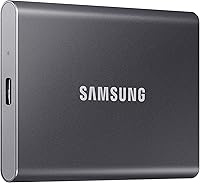
Samsung T7 Shield Review: Worth It? (October 2026)
This Samsung T7 Shield review finds it a strong fit for people who carry files through dusty or damp settings and want a portable 1 TB SSD. Its rated speeds depend on a compatible USB 3.2 Gen 2 connection and UASP mode.
On this page (8 sections)
- Samsung T7 Shield review: who should choose it?
- What do the Samsung T7 Shield speed claims mean?
- What does IP65 mean for everyday use?
- How does the T7 Shield compare with alternatives?
- How should you set up the Samsung T7 Shield?
- How much storage do you need?
- What mistakes should you avoid with the T7 Shield?
- Should you buy the Samsung T7 Shield?
The Samsung T7 Shield is a portable SSD for fast file transfers with added resistance to water, dust and drops. This Samsung T7 Shield review looks at who benefits from those features, how to set up the drive, and when another portable SSD makes more sense.
Samsung rates the 1 TB model for reads up to 1,050 MB/s and writes up to 1,000 MB/s. Those figures require a USB 3.2 Gen 2 host and cable, with UASP mode enabled.
The Shield suits people who carry active work files, photos or video between compatible devices and want added protection during transport. If your drive stays on a clean desk, you may get more value from a slimmer or higher-capacity option.
Samsung T7 Shield review: who should choose it?
Choose the T7 Shield if you need portable 1 TB storage with water, dust and drop resistance for travel, field work or a busy commute. Its rugged design is the main reason to pay attention to this model within the T7 family.
Samsung T7 Shield Portable SSD 1TB: Best for rugged commuters

- 1 TB capacity
- Up to 1,050 MB/s read and 1,000 MB/s write
- IP65 water and dust resistance
- Drop resistance up to 9.8 ft
A portable SSD for people who want Samsung's stated speed and added protection against water, dust and drops. Its top speed depends on a compatible host, cable and UASP mode.
Pros
- IP65 water and dust resistance
- Drop resistance up to 9.8 ft under controlled conditions
- Compatible with PC, Mac, Android devices and gaming consoles
- Samsung Magician can monitor drive health and manage updates
Cons
- Maximum speeds require USB 3.2 Gen 2 and UASP support
- Resistance capabilities may vary with actual conditions
The drive is compatible with PC, Mac, Android devices, gaming consoles and more. That broad compatibility makes it useful for moving working files between a computer and other devices, though the connector, file system and port still need to suit each device.
The Shield is a poor fit if your top needs are the lowest possible cost, a large desktop archive or the smallest possible drive. It is also not a substitute for a second copy of files you cannot replace.
The IP65 rating describes water and dust resistance, not permission to submerge the drive or use it while wet. Samsung says its resistance can vary with actual conditions, so treat the rating as added protection for everyday carrying rather than a reason to ignore care.
For a slimmer Samsung model with similar stated peak speeds, compare the Samsung T7 and T7 Shield. The comparison helps narrow the choice to the feature that matters most: the Shield's added resistance or the regular T7's aluminum body.
What do the Samsung T7 Shield speed claims mean?
The T7 Shield is rated for up to 1,050 MB/s read and 1,000 MB/s write speeds. These are maximum sequential figures, and a compatible connection is needed to approach them.
Check your computer or console port before buying for speed. A slower USB port can limit transfers, and a cable that does not support USB 3.2 Gen 2 can also hold the drive back.
UASP mode must be enabled for the stated maximum speeds. If you are moving many small files, your transfer may take longer than a single large-file copy, even when the drive and host support the right connection.
Don't choose based on the headline speed alone if your current device has older ports. The drive can still store and move files, but the connection may not deliver its maximum rate.
For everyday options beyond this model, see our guide to the best external SSDs for everyday storage. If you already own a drive and need connection steps, read how to use an external SSD with a laptop.
What does IP65 mean for everyday use?
The IP65 rating covers water and dust resistance under controlled conditions. Samsung describes resistance to water flow and active dust, while cautioning that performance can vary with real conditions.
That makes the Shield a sensible choice for dusty work areas, outdoor travel and damp-weather commutes where a drive may face more exposure than one kept at home. It does not make the drive waterproof in every setting.
Samsung also gives the Shield drop resistance up to 9.8 ft under controlled conditions. This adds a layer of protection against some falls, but it cannot guarantee that every drop or impact will leave the drive unharmed.
Keep the drive in a pocket or padded pouch when it is not connected. Avoid connecting it while wet or dusty, and keep important files backed up elsewhere.
How does the T7 Shield compare with alternatives?
The T7 Shield is the best fit here when rugged carry protection matters more than slimness or extra capacity. The other drives offer different trade-offs in body style, storage space or included security tools.
| Drive | Capacity | Stated top read / write | Notable feature |
|---|---|---|---|
| Samsung T7 Shield | 1 TB | 1,050 / 1,000 MB/s | IP65 rating; drop resistance up to 9.8 ft |
| Samsung T7 | 1 TB | 1,050 / 1,000 MB/s | Aluminum body; drop protection up to 6 ft |
| SanDisk Extreme Portable SSD | 2 TB | 1,050 / 1,000 MB/s | IP65 rating; carabiner loop |
| Lexar ES3 | 1 TB | 1,050 / 1,000 MB/s | Thin design; encryption software |
The Samsung T7 vs T7 Shield comparison focuses on the two Samsung drives. If you are considering another Samsung option, see the Samsung T9 review.
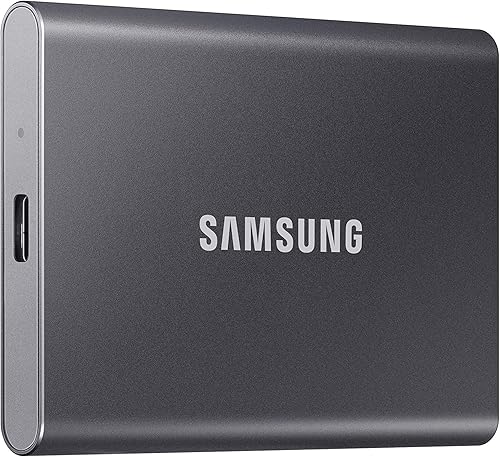
Samsung T7 Portable SSD 1TB: Best for slim Samsung storage
- 1 TB capacity
- Up to 1,050 MB/s read and 1,000 MB/s write
- Shock resistant
- Drop protection up to 6 ft
A Samsung alternative with similar stated peak speeds and an aluminum body. It has shock resistance and drop protection, but no stated IP65 rating.
Pros
- Same stated top read and write speeds as the Shield
- Drop protection up to 6 ft under controlled conditions
- Compatible with PC, Mac, smartphones and gaming consoles
Cons
- No stated water and dust resistance rating
- Maximum speeds depend on host and cable support
Pick the regular T7 if you want Samsung's stated peak speeds in an aluminum body and don't need the Shield's IP65 rating. Its stated drop protection is up to 6 ft under controlled conditions.
SanDisk Extreme Portable SSD 2TB: Best for growing libraries

- 2 TB capacity
- Up to 1,050 MB/s read and 1,000 MB/s write
- IP65 water and dust resistance
- Drop protection up to 3 m
This 2 TB portable SSD pairs a higher stated capacity with water and dust resistance. SanDisk also includes password protection with 256-bit AES hardware encryption.
Pros
- Double the stated capacity of the 1 TB Shield
- IP65 water and dust resistance
- Carabiner loop for attaching the drive
- Password protection with 256-bit AES hardware encryption
Cons
- Speed depends on the host device and other factors
- Water and dust protection requires the drive to be clean and dry before use
The SanDisk Extreme Portable SSD doubles the stated capacity to 2 TB and also has an IP65 rating. Its carabiner loop suits someone who wants to attach a drive to a bag or belt loop, and it includes password protection with 256-bit AES hardware encryption.
Lexar ES3 Portable SSD 1TB: Best for thin laptop bags

- 1 TB capacity
- Up to 1,050 MB/s read and 1,000 MB/s write
- USB-C cable included
- 256-bit AES encryption software
A thin 1 TB option with a USB-C cable and encryption software. Its stated top speed requires a USB 3.2 Gen 2 connection on both the computer and cable.
Pros
- Up to 1,050 MB/s read and 1,000 MB/s write
- USB-C cable included
- Lexar DataShield 256-bit AES encryption software
Cons
- MagSafe is not available in this version
- Full speed requires USB 3.2 Gen 2 or higher
Choose the Lexar ES3 if you want a thin 1 TB drive with a USB-C cable and encryption software. The stated top speed needs USB 3.2 Gen 2 or higher on both the computer and cable, and this version does not include MagSafe.
How should you set up the Samsung T7 Shield?
Start by checking the port, cable and file system needs of the device you plan to use. This avoids confusing a connection or formatting issue with a drive fault.
Connect the Shield directly to a compatible USB port with a suitable cable. If you want the maximum stated transfer speeds, verify USB 3.2 Gen 2 support and UASP mode on the host.
Before moving files, decide whether the drive will be shared among a computer, phone and console. Different devices can have different file system requirements, and formatting can erase existing files, so copy anything already on the drive before changing its format.
Create a clear folder structure before your first large transfer. For example, separate current projects, finished work and personal photos so you can find files later and avoid copying the wrong folder.
On supported iPhone workflows, Samsung says the Shield supports iPhone 15 ProRes 4K at 60 fps and recommends the included SSD cable. Confirm that your phone and recording settings can use external storage for the specific video workflow you have in mind.
If you plan to use Samsung Magician, its tools can monitor drive health, provide updates, protect data and set LED color combinations. Use it to check the drive periodically, but keep a separate copy of important files.
How much storage do you need?
The Shield's 1 TB capacity works for a working set of files, but your needs depend on how large your projects and media are. Video and large creative files can fill a drive more quickly than documents or smaller photos.
Choose the 2 TB SanDisk if you want more room in one portable drive. If you are unsure how much space to allow for your current files and future growth, use our guide to choosing the external drive size you need.
Don't treat a single portable drive as a full backup plan. Keep another copy on a separate drive or backup service, especially for irreplaceable photos, work files and personal records.
What mistakes should you avoid with the T7 Shield?
The most common mistake is expecting maximum speeds from any USB port or cable. Confirm USB 3.2 Gen 2 support and UASP mode before assuming the drive will reach its rated figures.
A second mistake is treating IP65 as waterproofing for all situations. Keep the Shield dry and clean before connecting it, and do not rely on its rating to protect it from every spill, immersion or harsh condition.
Avoid unplugging the drive while files are being written. Close files and applications that use it, then use your computer's safe eject option before disconnecting to reduce the chance of interrupted transfers.
Don't keep the only copy of valuable files on the Shield. Resistance features can help with some physical risks, but they do not prevent accidental deletion, loss or every type of device failure.
Should you buy the Samsung T7 Shield?
Choose the Samsung T7 Shield if you want a portable 1 TB SSD with IP65 water and dust resistance and stated drop resistance up to 9.8 ft. It is the clearest fit for people who carry files in settings where a standard drive may face more exposure.
Choose the regular T7 if you prefer its aluminum body and do not need the Shield's IP65 rating. Pick the SanDisk Extreme for 2 TB capacity and a carabiner loop, or the Lexar ES3 for a thin design with encryption software.
The Samsung T7 Shield review verdict is simple: buy it for rugged everyday carry, provided your devices and cable support the connection you need. If you want more storage, a slimmer body or a drive that will stay on a desk, choose the alternative that matches that priority.
Frequently asked questions
Is the Samsung T7 Shield worth choosing over the T7?
Choose the T7 Shield if its IP65 water and dust resistance and stated drop resistance up to 9.8 ft suit how you carry a drive. The regular T7 has similar stated peak speeds and drop protection up to 6 ft, but no stated IP65 rating.
Both need a compatible USB 3.2 Gen 2 setup for maximum speeds.
How fast is the Samsung T7 Shield?
Samsung rates the T7 Shield for sequential reads up to 1,050 MB/s and writes up to 1,000 MB/s. Those are maximum figures, not a promise for every setup: the host and cable must support USB 3.2 Gen 2, and UASP mode must be enabled.
Can you use the Samsung T7 Shield with an iPhone?
The T7 Shield supports iPhone 15 ProRes 4K at 60 fps video, and its compatible-device details include iPhone 15 and 16. Samsung recommends using the included SSD cable.
Check that your phone and recording setup support the storage and video workflow you plan to use.
Is the Samsung T7 Shield waterproof?
The T7 Shield has an IP65 rating for water and dust resistance, which is not the same as being waterproof for every situation. Samsung's rating comes from controlled conditions, and its stated resistance can vary with actual conditions.
Keep the drive dry and follow Samsung's care guidance.