What Size External Hard Drive Do I Need?
Choose an external hard drive larger than the data you plan to store: 1TB can suit a modest backup, 2TB gives room for a growing personal archive, and 4TB to 6TB fits larger photo libraries or multiple backups. Check your used space first and leave room for new files.
On this page (9 sections)
- What size external hard drive do I need for my files?
- What size external hard drive do I need for backup?
- What size external hard drive do I need for photos?
- When should you choose 4TB or 6TB?
- How much space do photos and videos take?
- Does a bigger external hard drive make a better backup?
- How do you choose between 1TB, 2TB, 4TB and 6TB?
- What size external hard drive do I need? Quick answers
- Choose capacity from the files you need to protect
Choose a drive with more capacity than the files you plan to store. 1TB can suit a modest backup, 2TB a growing archive, and 4TB to 6TB larger collections or several backup sets.
Check your used space and allow for future files.
A 1TB drive can suit a modest backup or photo collection. Choose 2TB for a growing personal archive, or 4TB to 6TB for larger libraries and several types of files.
Capacity is only one part of a backup plan. Keep another copy of important files, and see our guide to backing up Windows 11 to an external drive.
What size external hard drive do I need for my files?
Choose a drive that is larger than the files you plan to copy, with room left for new data. Your current used space is a better starting point than the total capacity printed on your computer.
| Drive size | A reasonable starting point | Consider more space if |
|---|---|---|
| 1TB | A modest computer backup or personal file collection | You have a large photo library, videos or multiple backups |
| 2TB | A growing photo and document archive | You keep several computers' files or large media folders |
| 4TB | Large personal collections or more than one backup set | Your files grow quickly or include substantial video |
| 6TB | Larger archives and room for several file types | You need even more space or keep many backup versions |
These are planning guides, not guarantees about how many photos or hours of video will fit. File sizes vary, and formatted capacity available to you is lower than the stated capacity.
How do I check how much storage I use?
Check your computer's storage settings and note the space in use. On Windows, open Settings, then System and Storage; on a Mac, open System Settings and General, then Storage.
Look at the folders you plan to back up, such as Documents, Pictures, Desktop and video libraries. If you plan to copy the whole computer, count the used space across the drive rather than only one folder.
Allow room for growth. Estimate how much new data you expect before you replace the drive or clear old files.
What size external hard drive do I need for backup?
For backup, choose a drive that can hold the full set of files you want to protect plus future additions. If your backup tool saves previous versions, deleted files or system images, it may need more room than a simple copy of your current folders.
A drive that only matches today's used storage can fill sooner than expected. Check your backup program's settings to see whether it keeps old versions and whether it backs up the full computer or selected folders.
| Backup plan | What to count |
|---|---|
| One-time copy | Current size of the folders you want to save |
| Regular file backup | Current files plus expected growth |
| Versioned backup | Current files, growth and retained older versions |
| Multiple computers | The data from each computer and the combined growth |
A separate backup drive is useful, but a single drive is still one copy that can be lost, damaged or fail. For important files, keep a second copy on another drive or in a separate location.
For a step-by-step Windows process, read how to back up Windows 11 to an external drive. If you are deciding between local storage and an online copy, see external hard drive vs cloud storage.
What size external hard drive do I need for photos?
Choose capacity based on the size of your photo library and whether it includes video. Camera RAW files, edited copies and high-resolution video can use more space than smaller phone photos.
Check the size of your existing Pictures or Photos library, then allow for future shoots. If you also plan to store video, include those files in your estimate rather than choosing based on photos alone.
A 2TB drive can be a practical middle step when 1TB leaves little room for new files. If your collection is already large or includes regular video imports, compare 4TB and 6TB choices instead.
Our guide to the best way to back up photos covers keeping more than one copy and organizing your photo archive.
When should you choose 4TB or 6TB?
Choose 4TB or 6TB when your current collection is large, you back up several devices or you need room for video and future growth. More capacity can help keep different file groups on one drive, but it does not replace a second backup copy.
A 4TB option is a step up for a growing library or a backup that covers more than one category of files. Check the used space on every device you plan to include before deciding.
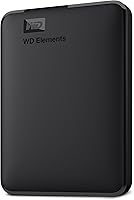
The 6TB WD Elements Portable has plug-and-play expandability and includes a SuperSpeed USB-A cable. Formatted capacity available to you is lower than the stated capacity.
If you are comparing drives specifically for backup storage, see our best external hard drives for long-term backup guide.
How much space do photos and videos take?
File size varies by camera, resolution, format and recording length, so check your own files instead of relying on a fixed photo count. One long video can take more space than many ordinary photos.
Use your current library as the baseline. Then include the size of a typical new batch of photos or video and how often you expect to add one.
For a useful estimate:
- Check the size of your existing photo and video folders.
- Estimate how much you add in a month or year.
- Multiply that growth by how long you want to keep adding files.
- Add other folders that belong in the backup.
- Leave extra room if the backup tool stores previous versions.
This approach will not predict every future file, but it gives you a more relevant starting point than a generic photo-per-terabyte estimate.
Does a bigger external hard drive make a better backup?
A bigger drive gives you more storage space, but backup safety depends on keeping usable copies, not capacity alone. A large drive can still be the only copy of your files.
Keep the external drive disconnected when you are not backing up if that suits your routine. For files you cannot replace, maintain another copy on a second drive or in a separate location.
An external drive is different from a cloud backup. A local drive gives you a physical copy you control, while a cloud service can keep a copy away from your home.
See our external drive vs cloud storage comparison.
How do you choose between 1TB, 2TB, 4TB and 6TB?
Choose 1TB for a modest current backup, 2TB for a growing archive, and 4TB or 6TB for larger collections or multiple backup needs. Total the files you intend to protect, then account for growth and backup versions.
Pick 1TB if your used space is well below that amount and your collection grows slowly. Pick 2TB if you want more room for photos and everyday files.
Pick 4TB or 6TB if you are backing up substantial media libraries, several devices or a large archive. If the drive will hold irreplaceable files, plan a second copy as part of the same decision.
What size external hard drive do I need? Quick answers
The right size depends on your current files, future growth and backup method. These answers can help narrow the choice before you compare drive models.
Is 2TB enough to back up a laptop?
A 2TB drive can be enough if the laptop's files you want to protect fit within that capacity and leave room for growth. Check used space and backup settings first; a full system image or retained versions may need more room than selected folders.
Is 4TB enough for photos and videos?
It may be enough for a substantial library, but photo and video file sizes vary widely. Check your existing folders and estimate future additions, especially if you record high-resolution video or keep both original and edited files.
Can I use a 1TB drive for a full computer backup?
You can use a 1TB drive if the data included in the backup fits and the backup method supports your plan. Check the computer's used storage and whether the software keeps older versions before relying on that capacity.
Should I buy more storage than I need now?
Leave room for files you expect to add and any older versions your backup software keeps. Planning ahead can help you avoid replacing a nearly full drive soon, while a second copy remains important for protecting files.
Choose capacity from the files you need to protect
Start by checking your current used storage, then choose the next capacity that gives space for future additions and retained backup versions. Choose 1TB or 2TB for smaller collections, and 4TB or 6TB for larger archives or multiple devices.
For essential files, plan a second copy as well. The best external storage drives for home computers guide can help you compare options for a broader home setup.
Frequently asked questions
What size external hard drive do I need to back up my computer?
Choose a drive with more space than the data you plan to copy, and leave room for future files and older versions if your backup software keeps them. Check used storage on your computer first.
A 1TB drive may suit a modest backup, while larger collections may call for 2TB, 4TB or 6TB.
Is 1TB enough for photos?
A 1TB drive can be enough for a smaller photo collection, especially if you keep only one copy and do not add large video files. Check how much space your current photos use, then allow for new shoots and edits.
For a growing library, 2TB or more gives you additional room.
Should my backup drive be bigger than my computer?
Usually, yes. A drive larger than the files you need to protect gives room for future growth and, depending on your backup method, previous file versions.
Check the space actually in use rather than relying only on the computer's advertised capacity.
How much extra space should I leave on an external hard drive?
There is no fixed amount that fits every person. Estimate how much data you expect to add before your next cleanup or drive replacement, and leave that much free.
If the drive will hold versioned backups, allow for the extra copies your backup settings retain.
Do I need one external hard drive or two?
Two independent copies reduce the chance that one drive failure, loss or accident leaves you without your files. Keep one copy separate from your everyday computer, and consider an additional copy in another location or a cloud service for important files.