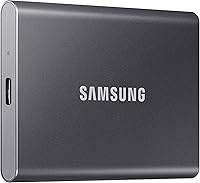
What to Look for in an External SSD
Start with the connection, then the capacity, then the toughness. A USB 3.2 Gen 2 drive fits most laptops and phones, 1TB suits everyday work, and an IP65 rating protects a drive that travels. Match the drive to how you'll actually use it, not to the biggest number.
On this page (9 sections)
- What to look for in an external SSD first: the connection
- How much capacity should an external SSD have?
- Which features make an external SSD rugged?
- Should you pay for hardware encryption?
- What transfer speeds are worth paying for?
- Do you need heat control and software tools?
- Match the form factor to how you carry it
- Does an external SSD work with your game console?
- Which drive fits your use case?
The right external SSD comes down to four checks: the port it plugs into, the capacity you need, whether it survives a bag, and whether you can lock your files. Get those right and the rest is a matter of budget.
Most buyers over-shop the speed number and under-shop the connector. That is the wrong way round, because a fast drive on a slow port runs at the port's pace.
Read on for the checks in order, with the trade-offs each one forces.
What to look for in an external SSD first: the connection
Start with the port on the device you'll plug the drive into. A drive is only as fast as the port it meets, so a laptop with USB 3.2 Gen 2 settles the question.
The USB naming is messy. USB 3.2 Gen 2 is the common fast standard at up to 10 Gbps, and Gen 2x2 doubles the lanes for up to 20 Gbps.
Thunderbolt ports carry USB drives too, usually at high speed. Older USB-A ports on a desktop still work with a USB-C drive if you use the right cable.
Check the cable in the box rather than assuming it matches the drive's top speed. The Samsung T7 Shield ships with its SSD cable and reaches its fastest read and write speeds only when the host and cable both support USB 3.2 Gen 2.
A drive's connector type also decides whether you need an adapter. A USB-C drive plugged into an older USB-A port needs a USB-C to USB-A cable or a small adapter, and that extra link must support the same speed standard or it becomes the bottleneck.
Check the shape of the port on your laptop, desktop and console before you commit.
Do you need USB 3.2 Gen 2x2?
Only if your computer has a Gen 2x2 port. The Samsung T9 is built around USB 3.2 Gen 2x2 and reaches up to 2,000 MB/s, but that number depends on the host device supporting the controller.
On a Gen 2 port the T9 still works well. You just won't see its full speed, and that's fine for most file work, photo libraries and backups.
Pick Gen 2x2 only for a known port and for work where transfer time really hurts, such as large video files or big game libraries. A Gen 2x2 drive bought for a Gen 2 laptop is money spent on speed you cannot reach.
Phones are a separate question. Many recent Android phones and the iPhone 15 and 16 family take USB-C drives directly, and both the T7 Shield and T9 support iPhone 15 Pro Res 4K at 60fps recording.
A phone's own port speed still caps the transfer rate, so treat the drive's headline figure as a ceiling, not a promise.
If iPhone storage is the point, our external SSD for iPhone picks narrow it down.
How much capacity should an external SSD have?
1TB suits most people; 2TB is the comfortable step; 4TB is for large media. Capacity drives the price, so buy for your current and next-year files rather than for a what-if.
A 1TB drive holds a big photo library, years of documents and a few games with room left. The hassle is that capacities sell out of stock and pricing tiers jump, so planning helps.
Go bigger if you edit video, keep a music production library or plan to use the drive as a game library. Go smaller if it's just for moving files between computers.
Look at the capacity range each model offers. The T7 Shield runs from 1TB to 4TB, so you can pick the size that matches your files without changing drive family.
The T9 is sold as a 1TB portable drive and the SanDisk Extreme here is the 2TB version. Reading the exact capacity matters, because the same drive name often appears in several sizes and the specs are easy to mix up.
Consider how the drive fits into your backup plan too. An SSD is fine as a backup target, but a single drive is not a complete backup.
Keep a second copy somewhere else.
Capacity and speed also trade off in strange ways on smaller drives. A very full SSD can slow down as it runs short of free space for housekeeping tasks.
Leave at least 15–20% free on any SSD, because flash memory needs spare blocks to stay quick. A drive you intend to fill to the brim is better bought one size up.
Which features make an external SSD rugged?
An IP rating and a drop rating are the two specs that matter for travel. IP65 covers water and dust, and a stated drop height tells you what the maker tested.
The Samsung T7 Shield carries an IP65 rating for water and dust resistance plus drop resistance to 9.8 feet. Its outer elastomer shell adds grip and cushioning.
The SanDisk Extreme Portable SSD also has IP65 water and dust resistance and up to 3-meter drop protection. It includes a carabiner loop for clipping to a belt loop or backpack.
Read the footnotes on any rugged claim. Samsung notes that its IP65 rating was tested with water flow at 100 kPa for 3 minutes and active dust under 2 kPa for 8 hours, both in controlled conditions, and that real-world resistance varies.
The drop figure was tested to 9.8 feet under controlled conditions too. Those caveats are normal and don't cancel the rating; they just tell you it's a test result rather than a promise for every accident.
These ratings come from controlled tests, and real life is messier. Still, a rated drive is a better bet in a backpack than a bare aluminum rectangle.
Pick a rugged model if the drive leaves the house. If it stays on a desk, a plain drive is enough and you can put the saving into capacity.
A drive rated for dust also helps in a laptop bag, where lint and grit collect over months.
Should you pay for hardware encryption?
Yes, if you carry work files, tax records or anything personal. Hardware encryption keeps data locked on the drive itself, so a lost drive is far less of a problem.
The SanDisk Extreme Portable SSD includes password protection with 256-bit AES hardware encryption. The Samsung T7 Shield supports hardware encryption, and Samsung Magician adds drive health monitoring and settings.
The Samsung T9 lists AES 256-bit hardware encryption among its features as well.
Software encryption is the free alternative, usually a built-in disk tool on your computer. It costs nothing extra but leans on your device and your backup of the recovery key.
It also only works on machines where the encryption software runs.
Hardware encryption is simpler, because it travels with the drive. It also means the drive's security does what the maker says, without an app on every machine.
Whichever you choose, keep the recovery key or password somewhere other than the drive. Losing it locks you out of your own files.
What transfer speeds are worth paying for?
Up to 1,050 MB/s is plenty for everyday work. Jump to 2,000 MB/s only when moving huge files is a regular chore, and only if your port supports it.
The numbers on the box are sequential reads and writes under ideal conditions. Real transfers of many small files run slower than one giant file, and heavy folder copies can be slower still.
The ranges line up roughly like this. A USB 3.0 drive does what an older port can manage, set by the port at 5 Gbps.
Gen 2 drives like the T7 Shield and SanDisk Extreme hit the 1,050 MB/s area. Gen 2x2 drives like the T9 claim up to 2,000 MB/s.
Note the split within a single drive: the T7 Shield is rated up to 1,050 MB/s read and 1,000 MB/s write, and the SanDisk Extreme uses the same read and write figures. Write speed is the one that matters when you're copying files onto the drive.
The catch is always the host. To reach maximum speeds the host device and cable must support the same standard, and UASP mode must be on.
Samsung states this in its performance notes.
Pay for speed once, with the port in mind. If your laptop is USB 3.2 Gen 2, a Gen 2 drive is the sensible spend and a Gen 2x2 drive is headroom.
For backup jobs and document work, even a 1,050 MB/s drive finishes long before you notice the difference.
If you'll use it across several machines, our external SSD roundup ranks the main options.
Do you need heat control and software tools?
For long transfers and heavy projects, yes. Sustained speed depends on heat, and a drive that throttles early feels slow when you're editing.
The Samsung T9 uses Dynamic Thermal Guard and Samsung says the drive stays below 140°F in controlled conditions. The T7 Shield also uses Dynamic Thermal Guard to manage heat.
The T9's thermal note adds that the figure is a controlled internal quality test under the IEC 62368-1 standard, so it describes the design target rather than a reading you'll see in every room.
Software is the other half. Samsung Magician monitors drive health, protects data, delivers firmware updates and sets LED colors on the T7 Shield.
The SanDisk Memory Zone app helps manage files and free up space.
Neither is essential for a simple backup drive. Both are useful if you rely on the drive daily and want warning of problems before they become data loss.
The SanDisk app's space-freeing tool is handy on a 2TB drive used for photos, where old exports pile up quietly.
Treat software as a maintenance aid, not a guarantee. Firmware updates fix bugs, but nothing stops a drive from failing unexpectedly, so backups still matter.
Match the form factor to how you carry it
Portable SSDs come in a handful of shapes, and the shape decides whether the drive lives in your pocket or on your desk. A slim drive with a short cable travels best, while a larger one is easier to label and less likely to slide under a car seat.
The T7 Shield measures 3.39 by 2.24 by 0.49 inches and weighs little enough for a jacket pocket. The T9 weighs 4.32 ounces, and the SanDisk Extreme carries a carabiner loop designed to hook onto a bag.
Check the size against the pocket or pouch you have in mind rather than assuming all three are the same size.
Cable and connector matter as much as size. A short USB-C cable keeps the drive close to the device and reduces accidental knocks.
A longer cable helps when the drive sits on a desk.
Check what's included. Both Samsung drives ship with an SSD cable, and Samsung recommends using the included cable to reach full speed.
Bring a spare cable that matches the drive's standard, because a cable that doesn't can quietly drag the whole setup back to slower speeds.
Choose a drive that fits your bag, not the other way round. A drive left at home is no use, and one that swings loose on a long cable can fall.
Does an external SSD work with your game console?
Sometimes, and the console model decides what's allowed. The T7 Shield lists compatibility with PlayStation 5 and Xbox Series X and S, plus the Nintendo Switch family.
The T9 lists compatibility with PlayStation 4 and 5, Xbox Series X and S. Console firmware changes over time, and a drive that stores games may not run them directly depending on the console.
Storing and playing are different jobs. A drive makes a good archive for games you rarely play, even when the console won't launch games from it.
A 1TB drive holds a good number of installed games, and the fast read speed cuts load times when the console does allow play from the drive.
Also check the computer side. The T9's hardware platform is PC and its compatible devices include Mac, PC and Tablet; the T7 Shield lists PC, Mac, Android devices and gaming consoles.
If your setup is unusual, the drive's compatibility line is the quickest check.
For a laptop or desktop, the setup steps are simple but worth doing properly. Our how to use external SSD on laptop guide covers formatting and safe removal.
On a PC that ignores a new drive, the fix is usually quick. This guide on how to get PC to recognize external SSD walks through the steps.
Which drive fits your use case?
Pick a rugged Gen 2 drive for most people, a Gen 2x2 drive for heavy video, and a 2TB drive for large libraries. The checks above narrow the field fast.
The Samsung T7 Shield is the safe all-rounder. It has IP65 protection, a 9.8-foot drop rating, up to 1,050 MB/s and 1TB to 4TB capacities, so it covers travel, work and backups in one shape.
The Samsung T9 is the speed pick. Its USB 3.2 Gen 2x2 interface reaches up to 2,000 MB/s, and Dynamic Thermal Guard helps it hold pace through long projects.
Underneath, it's a straightforward 1TB portable drive.
The SanDisk Extreme Portable SSD is the capacity pick. The 2TB model runs up to 1,050 MB/s, carries IP65 and 3-meter drop protection, and adds 256-bit AES hardware encryption with a carabiner loop for secure carrying.
Its Memory Zone app rounds out the package for file management.
All three share the same core idea: a fast flash drive in a small shell. The difference is where each one puts its weight, the T7 Shield on toughness and capacity choice, the T9 on raw speed and heat control, the SanDisk on capacity and a clip.
So the rule is simple. Buy the T7 Shield for all-round use, the T9 if your port and work demand the fastest transfers, and the SanDisk Extreme if 2TB and a clip matter more than a badge.
When you're shopping for what to look for in an external SSD, keep the order in mind: port, capacity, toughness, encryption. Those four checks decide almost everything else, and the rest is a choice between good drives.
Frequently asked questions
Do external SSDs work with phones and tablets?
Many USB-C external SSDs work with recent phones, including iPhone 15 and 16 models. The Samsung T7 Shield and T9 both support iPhone 15 Pro Res 4K at 60fps video recording with the included cable.
How long do external SSDs last?
There is no fixed lifespan. Flash memory wears slowly with heavy rewrites, and the drive's own software tools can flag health problems early.
Keep backups, because any drive can fail without warning.
Do I need a case or cover for a portable SSD?
Not if the drive is already rated for drops and dust. A rugged model with an IP rating and drop protection handles a bag or backpack on its own.
A plain brushed-metal drive may want a sleeve.
Is a bigger SSD always faster?
No. Speed comes from the controller, the interface and the host device, not the capacity.
A 1TB USB 3.2 Gen 2x2 drive can outrun a 4TB drive on an older port.