9 Best External Hard Drives for Mac Time Machine (November 2026)
The best external hard drives for Mac Time Machine backups include the Aiolo Innovation 500GB External Hard Drive Ultra for a first Time Machine drive, the Seagate Portable 2TB for the average Mac user, and the LaCie Rugged USB-C 4TB for creative work on the move.
On this page (4 sections)
The best external hard drive for Mac Time Machine backups is the Aiolo Innovation 500GB External Hard Drive Ultra, a light, quiet portable that covers a first full backup plus months of changes for an entry-level Mac. For a larger library, the WD Elements Portable 6TB gives the most room for long backup histories.
Time Machine saves hourly snapshots until the drive fills, then thins old ones. A drive roughly twice your Mac's storage keeps a useful history without erasing too early.
That rule points most people to 1TB or 2TB. A 256GB MacBook Air pairs well with the Aiolo's 500GB, while a Mac with a 1TB drive or a big photo library needs 2TB and up.
Our guide to the best 4TB external hard drive covers the next step up.
Our picks at a glance
-
1
 Best for a first Time Machine drive
Aiolo Innovation 500GB External Hard Drive Ultra
9.4/10 our score
See it on Amazon -
2

-
3

The best external hard drives for Time Machine backups compared
The Aiolo Innovation 500GB wins on fit for a first backup drive: small, quiet, and priced in the budget tier. The rest of this list solves specific needs, from the 6TB WD Elements for massive libraries to the LaCie Rugged for drives that travel.
Aiolo Innovation 500GB External Hard Drive Ultra: Best for a first Time Machine drive
- USB 3.0 thickened copper cable
- Read speeds up to 110MB/s-133MB/s
- USB to Type C adapter included
- Noise-free motherboard
A light, quiet portable drive that covers a modest Mac library and arrives with the cables you need to connect to newer laptops.
Pros
- Small enough to live beside a laptop
- USB-C adapter in the box
- Quiet operation
Cons
- Smallest capacity in this group
- Not built for rough handling
The Aiolo Innovation 500GB suits someone setting up Time Machine for the first time on a MacBook Air or a Mac with a 256GB drive. Its 500GB capacity sits slightly under Apple's twice-the-storage guideline, though it still leaves room for months of hourly snapshots before old ones start to thin.
The USB 3.0 cable uses thickened copper, and Aiolo lists read speeds of 110MB/s to 133MB/s and writes around 103MB/s. In practice the first full backup of a light Mac finishes in well under an hour, then hourly runs stay short.
It weighs 0.22 kg and the motherboard is built for quiet running, so it can sit next to the laptop without adding fan noise. A USB to Type C adapter comes in the box, which matters on Macs with only USB-C ports.
The trade-off is capacity: a Mac with a 512GB or 1TB drive outgrows 500GB fast. If your library is large, start with the Seagate 2TB instead.
Seagate Portable 2TB: Best for the average Mac user
- USB 3.0
- Works with Windows or Mac
- Plug and play setup
- 18 inch USB cable included
A mainstream 2TB portable that gives most Mac owners room for a full backup plus a year or more of changes without reformatting pain.
Pros
- Plenty of room for a typical library
- No software install to start
- Affordable per terabyte
Cons
- Needs reformatting for Time Machine
- Plain plastic shell offers no drop protection
The Seagate Portable 2TB is the pick for the average Mac owner, the person with a 512GB or 1TB machine who wants one drive to last. 2TB meets the twice-the-storage rule for both, so Time Machine keeps a long history instead of erasing snapshots early.
Setup is plain. Seagate says it connects for automatic recognition with no software, and an 18 inch USB 3.0 cable is included.
Mac users still need to erase the drive as Mac OS Extended or APFS in Disk Utility, since it ships set up for Windows first.
The 7200 rpm mechanism inside moves ordinary backup traffic without drama. It's not a speed machine, but hourly snapshots are small and steady, so raw speed matters less than room to keep old versions.
It's the least expensive way here to get past the 1TB mark. The plastic shell offers no drop protection, though, so it's a stay-at-home drive.
For a bigger jump in room, look at our best desktop external hard drive picks.
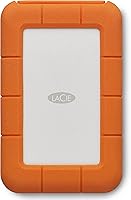
LaCie Rugged USB-C 4TB: Best for creative work on the move
- USB-C with USB 3.0 adapter
- MIL-STD-810F drop resistance up to 4 ft
- IP52 dust and drip rating
- 256-bit AES hardware encryption
A tough 4TB drive for Mac users who carry their backup between office, studio and home. The rubber shell takes drops that would end a plastic drive.
Pros
- Survives 4 ft drops
- USB-C cable and USB-A adapter
- Hardware encryption built in
Cons
- Heavier than a bare portable
- Premium price for the capacity
The LaCie Rugged USB-C 4TB is for the Mac user who moves the backup between places. Photographers, editors and anyone who works from a bag get military-grade drop resistance tested to 4 ft, plus IP52 dust and drip protection and 1-ton crush resistance.
The 4TB capacity gives a serious library room for full snapshots. A USB-C cable comes in the box and a USB 3.0 adapter covers older Macs.
Built-in 256-bit AES hardware encryption with password protection matters when a drive with a whole photo archive leaves the house.
LaCie backs it with Rescue Data Recovery Services and a 3-year limited warranty. Those extras are why it costs more than a plain 4TB portable.
The weight and the rubber shell are the trade-offs. It's heavier than a bare drive and takes more bag space.
If the drive never leaves your desk, the extra toughness is money spent on protection you won't use.
YOTUO 1TB External Hard Drive: Best for mixed Mac and console storage

- USB 3.0 and USB-C connectivity
- Patented silicone sleeve
- USB 3.0 speeds up to 5Gbps
- Works with Windows, Mac and Linux
A 1TB drive with a shock-absorbing sleeve that handles Mac backups and game storage from one pocketable unit.
Pros
- USB-C and USB-A support
- Silicone sleeve cushions falls
- Light at 0.16 kg
Cons
- Mirror finish shows fingerprints
- Capacity fills faster than 2TB rivals
The YOTUO 1TB External Hard Drive suits a household where one drive has to do two jobs. It's formatted easily for Mac backups and also works with PS4 and Xbox consoles for game storage.
The USB 3.0 and USB-C hardware means it plugs into a current MacBook without an adapter.
The patented silicone sleeve is the standout detail. A portable backup drive that lives in a bag gets bumped, and the sleeve cushions it.
At 0.16 kg it's light enough to carry every day, and the mirrored finish looks sharper than the plain plastic rivals.
Speeds up to 5Gbps keep hourly snapshots quick. The 1TB capacity meets the twice-the-storage rule for a 512GB Mac but not for a 1TB one.
Its trade-off against the Seagate 2TB is room. If your Mac has a big drive or you plan to add video, 1TB won't hold a long history.
For a Mac-only backup, the Seagate 2TB buys more space for similar money.
Seagate Backup Plus Slim for Mac 1TB: Best for Mac-native setup

- Time Machine compatible
- USB 3.0
- Minimalist metal enclosure
- Scheduled backups
A slim metal drive sold with Mac in the name and a single-click backup habit in mind. Reformatting for Time Machine may still be needed.
Pros
- Thin metal body
- Mac-focused branding
- Works with Windows too
Cons
- 1TB only
- Reformatting may still be required for Time Machine
The Seagate Backup Plus Slim for Mac 1TB is the drive for someone who wants Mac-focused setup and a thin metal body. Seagate lists it as Time Machine compatible and includes a single-click or scheduled backup habit.
The 1TB capacity suits a 256GB or 512GB Mac. The minimalist metal enclosure is thinner than the plastic portables here, so it slips into a laptop sleeve without a bulge.
USB 3.0 and the included cable keep setup to a single connection.
Seagate says reformatting may be required for Time Machine even with the Mac name on the box, so expect one trip to Disk Utility. The two-year limited warranty is shorter than the LaCie's three years.
Its limit against the WD My Passport is security. This drive has no encryption or password protection, so a stolen bag means an open backup.
If your MacBook travels a lot, the My Passport's locked storage is the safer pick.
WD Elements Portable 6TB: Best for large photo and video libraries

- 6TB in a 2.5-inch body
- USB 3.2 Gen 1 (5Gbps)
- Plug-and-play
- Works with PC and Mac
The biggest capacity here in a portable shell. It gives a Mac with years of photos and video room for full snapshots without juggling drives.
Pros
- 6TB holds long backup histories
- USB 3.2 Gen 1 speed
- Simple plug-and-play
Cons
- Large footprint for a portable
- No hardware encryption listed
The WD Elements Portable 6TB is for the Mac user with years of photos, video or a huge iTunes library. 6TB is the largest capacity here, enough for full snapshots of a 1TB or 2TB Mac plus older versions kept for a long time.
WD calls it the first 6TB 2.5-inch portable drive. USB 3.2 Gen 1 moves data at 5Gbps, and the drive is plug-and-play.
Mac users erase it once in Disk Utility, then Time Machine takes over.
The trade-off is its size. A 6TB portable is noticeably bigger and heavier than a 2TB unit, so it belongs on a desk rather than in a bag.
It also has no encryption features, which matters if the drive holds unencrypted family photos.
Buy it when capacity is the whole point. A Mac with a 2TB internal drive needs at least 4TB, and 6TB gives headroom.
Our external hard drive for photographers roundup covers faster options for big RAW libraries.
WD My Passport 2TB: Best for encrypted backups

- Password protection and hardware encryption
- Backup software with ransomware defense
- USB 3.1/USB 3.0 compatible
- Slim aluminum shell
A 2TB drive whose selling point is locked-down storage. Password protection and encryption suit a MacBook that travels.
Pros
- Hardware encryption
- Slim aluminum design
- Ransomware defense in the software
Cons
- Software must be downloaded
- Encryption adds a password step to restores
The WD My Passport 2TB is the encrypted pick. Password protection and hardware encryption keep a backup unreadable if the drive is lost or stolen, and the included software adds ransomware defense.
For a MacBook that leaves the house daily, that's the feature worth paying for.
The 2TB capacity meets the twice-the-storage rule for a 512GB or 1TB Mac. The aluminum shell is slim and durable, and USB 3.0 keeps hourly backups moving.
The encryption comes with a catch. The software needs downloading and installing, and a restore means remembering the password.
Lose it and the data stays locked.
Against the Seagate Portable 2TB, this drive gives up nothing in capacity and adds security. The extra step is the password.
If your backup drive never leaves a home desk, the Seagate's simpler setup is easier. If it travels, the My Passport wins.
Toshiba Canvio Basics 2TB: Best for a simple set-and-forget drive

- USB 3.0 and USB 2.0
- No software to install
- Matte smudge-resistant finish
- No external power cord
A plain 2TB portable for Mac users who want to plug in and let Time Machine do the rest. It arrives formatted for Windows, so Mac setup starts with Disk Utility.
Pros
- Low-key matte shell
- 2TB at a modest price tier
- Bus powered
Cons
- Pre-formatted NTFS
- No encryption features
The Toshiba Canvio Basics 2TB is for the Mac user who wants a plain, quiet drive and no software. It needs no software to install, and its matte finish resists smudges on a desk where it sits all day.
The 2TB capacity clears the twice-the-storage rule for most Macs. USB 3.0 and USB 2.0 both work, so an older Mac with only USB 2.0 ports still connects.
There's no external power cord; the Mac's USB port powers it.
Mac users do have one setup step. Toshiba pre-formats it NTFS for Windows, so Time Machine setup starts by erasing it to a Mac format in Disk Utility.
Its trade-off is features. There's no encryption, no drop protection and nothing beyond the basics.
Against the Seagate Portable 2TB it matches on capacity and simplicity. Choose the Toshiba for its matte shell and the Seagate for its wider availability and brand support.
SSK Portable SSD 1TB: Best for fast first backups

- Read up to 1050MB/s
- USB-C and USB-A cables
- S.M.A.R.T. health diagnostics
- Aluminum case
A solid-state drive that finishes the initial Time Machine backup far quicker than a spinning disk. The 1TB capacity limits how long that history lasts.
Pros
- Much faster than mechanical drives
- Ships in exFAT for easy Mac use
- Light at 0.06 kg
Cons
- Costs more per terabyte
- 1TB fills quickly with video
The SSK Portable SSD 1TB is the speed pick. Its solid-state design reads up to 1050MB/s, so the first full Time Machine backup of a 1TB Mac finishes far faster than on any spinning drive here.
After that, hourly snapshots are quick and silent.
It ships in exFAT, so it needs erasing and reformatting to APFS or Mac OS Extended in Disk Utility before you use it for Time Machine. Both USB-C and USB-A cables are included.
S.M.A.R.T. health diagnostics and TRIM support help you keep an eye on the drive's condition over years of backups.
The aluminum case handles a 1 meter drop.
The 1TB capacity limits the backup history. For a 256GB Mac that's fine, but a 1TB Mac will see snapshots thinned sooner.
SSDs also cost more per terabyte than mechanical drives.
Buy it when backup speed matters, such as restoring a full Mac in a hurry. For long history on a budget, a 2TB mechanical drive wins.
Our external hard drive for a Windows PC roundup covers the same question for Windows users.
How we compared these Time Machine drives
We compared these drives by what Time Machine actually needs: enough capacity to keep a history, a connection a Mac can use, and reliability features that match how the drive is carried. Capacity came first, checked against Apple's twice-the-storage guideline.
Then we weighed connection type. USB-C cables or adapters in the box save a purchase on newer Macs.
USB 3.0 speed matters most for the first full backup and full restores; hourly snapshots are small either way.
We also looked at the extras that change daily use: encryption for a traveling MacBook, drop protection for a bag drive, quiet running for a shared desk. Our scores weigh specs, features and the fit with a Mac Time Machine setup.
Questions to ask before you buy a Time Machine drive
How much space should a Time Machine drive have?
Plan for at least twice your Mac's internal storage. A 256GB MacBook Air works with a 500GB drive.
A 512GB or 1TB Mac needs 2TB.
A Mac with 2TB or more, or a large video library, should start at 4TB and go up to the 6TB WD Elements.
Should you buy a hard drive or an SSD for backups?
A mechanical hard drive is the better default for Time Machine. It gives more capacity per dollar and handles hourly background backups without strain.
An SSD like the SSK is worth it when you restore often or want the first backup finished quickly.
Speed matters more for full restores than for routine snapshots.
Does the drive need to be USB-C?
No. USB-A drives work fine through a USB-C adapter.
Several picks here include a USB-C cable or adapter in the box, which saves a separate buy.
If your Mac has only USB-C ports, check what's included before you order.
Which format should the drive use for Time Machine?
Time Machine needs a Mac format, so erase the drive in Disk Utility first. Most Windows-formatted drives, including the Toshiba Canvio and Seagate Portable, arrive as NTFS.
The SSK ships in exFAT and also needs erasing to APFS or Mac OS Extended before use with Time Machine.
Let Time Machine erase the drive when it asks during setup.
Is encryption worth it on a backup drive?
Yes, if the drive leaves your home. The WD My Passport and LaCie Rugged both offer password protection and hardware encryption.
A locked backup stays unreadable if the drive is lost.
The cost is one more password to remember, and a forgotten password means the data stays locked.
How often should you replace a Time Machine drive?
Replace it when it fills or when you need more room, not on a fixed schedule. A 2TB drive with a 512GB Mac can run for years.
Watch for slow downs or errors during backups as the drive ages.
A second drive kept elsewhere adds a second copy of your backups.
Verdict: which Mac Time Machine drive should you buy?
Buy the Aiolo Innovation 500GB for most people setting up a first Time Machine backup, because its 500GB fits an entry-level Mac and its quiet, light body suits a laptop desk. It's the highest score here and the simplest place to start.
Pick the Seagate Portable 2TB when your Mac has 512GB or 1TB of storage and you want a long history without spending much. Pick the WD Elements Portable 6TB for a large photo or video library.
Pick the LaCie Rugged 4TB or WD My Passport 2TB when the drive travels and you want protection or encryption. Pick the SSK Portable SSD 1TB when speed matters most.
The best external hard drive for Mac Time Machine is the one that holds twice your Mac's storage, so size the drive first and the extras second.
Our top 3 picks at a glance
-
1
Best for a first Time Machine drive
Aiolo Innovation 500GB External Hard Drive Ultra
9.4/10 our score
See it on Amazon -
2
-
3
Frequently asked questions
What size external hard drive do I need for Time Machine?
Apple recommends a drive at least twice the size of the storage you're backing up. For a 256GB MacBook Air, a 500GB drive works.
For a 512GB or 1TB Mac, choose 2TB or more so older snapshots have room to stay.
Can I use any external hard drive for Time Machine?
Yes, as long as the drive connects over USB or Thunderbolt and is formatted correctly. Time Machine asks to erase the drive when you set it up.
Most drives sold for Mac ship ready, while Windows-formatted models need erasing first.
Should I buy a hard drive or an SSD for Time Machine?
A mechanical hard drive gives you more backup space per dollar and is the usual choice. An SSD finishes the first backup faster but costs more per terabyte.
For hourly background backups, the speed difference matters less than capacity.
Is it safe to keep my Time Machine drive plugged in all the time?
Yes, Time Machine runs hourly backups when the drive is connected. A portable drive draws power from the Mac's USB port and adds little heat.
Unplug it before carrying the laptop so the cable and connector don't get stressed.
Can I use a Time Machine drive on both Mac and Windows?
Only one backup format at a time. Time Machine needs its own partition or drive formatted for Mac.
You can split a large drive into two partitions, one for Time Machine and one in exFAT for sharing files with Windows.
Do I need a USB-C drive for a newer Mac?
No, a USB-A drive works through a USB-C adapter or hub. Several drives here include a USB-C cable or adapter in the box.
Check what's included so you don't need to buy a separate adapter.