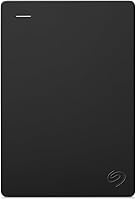
9 Best External Hard Drives for Photographers (October 2026)
The best external hard drives for photographers include the Samsung T7 Shield Portable SSD 1TB for field editing, the SanDisk Extreme Portable SSD 2TB for larger mobile projects, and the LaCie Rugged USB-C 4TB for rugged HDD storage.
On this page (7 sections)
- Which external hard drives suit photographers?
- How much external storage do photographers need?
- Is an SSD or HDD better for photo editing?
- How should you set up a new photo drive?
- How can you protect a photo archive?
- What mistakes should photographers avoid?
- Which external hard drive should a photographer choose?
The Samsung T7 Shield 1TB is the best external hard drive for photographers who need a portable working drive. This roundup also covers larger SSDs for active shoots, rugged HDDs for field copies, and a desktop drive for a growing archive.
A photo workflow has different storage needs at different stages. You may want quick access to the files you are editing today, room for completed shoots, and another copy in case a drive is lost or damaged.
Use an SSD when you regularly move large folders or edit files from the external drive. Choose an HDD when capacity is the priority and you can allow more time for transfers.
Neither type should be the only home for important images.
For an overview of other home storage options, see our guide to external storage drives for home computers. For a separate copy kept over time, our guide to external hard drives for long-term backup explains the role of archive storage.
Our picks at a glance
-
1

-
2

-
3

Which external hard drives suit photographers?
The best external hard drive for photographers depends on where the drive will live and what you expect it to do. An SSD suits active editing and mobile transfer work, while an HDD can provide more space for an archive that stays at a desk or travels as a backup.
This roundup compares capacity, connection, speed claims and protection features against common photo workflows. The scores reflect how closely each drive’s features suit the needs of photographers looking for portable work space, field copies or a larger archive.
| Product | Best for | Capacity | Drive type | Connection | Our score |
|---|---|---|---|---|---|
| Samsung T7 Shield Portable SSD 1TB | field editing | 1TB | Portable SSD | USB 3.2 Gen 2 | 9.1 |
| SanDisk Extreme Portable SSD 2TB | larger mobile projects | 2TB | Portable SSD | USB 3.2 Gen 2 | 8.9 |
| LaCie Rugged USB-C 4TB | rugged HDD storage | 4TB | Portable HDD | USB-C, USB 3.0 adapter included | 8.7 |
| Samsung T9 Portable SSD 1TB | sustained transfers | 1TB | Portable SSD | USB 3.2 Gen 2x2 | 8.6 |
| Samsung T9 Portable SSD 2TB | fast 2TB workflows | 2TB | Portable SSD | USB 3.2 Gen 2x2 | 8.5 |
| LaCie Rugged USB-C 2TB | smaller field archives | 2TB | Portable HDD | USB-C, USB 3.0 adapter included | 8.2 |
| WD My Passport 5TB | a large portable archive | 5TB | Portable HDD | USB-A cable included | 8.1 |
| Seagate One Touch Desktop 8TB | a desk-based archive | 8TB | Desktop HDD | USB-C, power adapter included | 8.0 |
| LaCie Rugged 5TB with Encryption | a protected 5TB field copy | 5TB | Portable HDD | USB-C | 7.9 |
Best external hard drive for photographers who edit in the field
The Samsung T7 Shield is a strong choice for photographers who carry an active library and want a compact SSD with protection from dust, water and drops. It is suited to a working set of current projects rather than a whole photo archive.
Samsung T7 Shield Portable SSD 1TB: Best for field editing
- 1TB capacity
- Up to 1,050/1,000 MB/s read/write speeds
- IP65 water and dust resistance
- Drop resistance up to 9.8 ft
A compact SSD with stated read and write speeds up to 1,050/1,000 MB/s. Its IP65 rating and drop resistance suit photographers who carry a working drive.
Pros
- Fast stated read and write speeds
- Water and dust resistance
- Compatible with PC, Mac and Android devices
Cons
- 1TB may be limiting for a large photo archive
- Maximum speeds depend on host and cable support
Its 1TB capacity can hold selected projects, exports and catalog files, but it may not fit a large collection of completed shoots. Use it as an active drive and keep another copy of finished work on a separate device or service.
Samsung lists compatibility with PC, Mac, Android devices and gaming consoles. The maximum stated read and write speeds depend on the host, cable and UASP support, so check that your computer’s port supports USB 3.2 Gen 2.
Choose it if you need a portable SSD for current edits and value its IP65 rating and drop resistance. Skip it if you want a single drive to contain years of photo work; the 2TB SanDisk gives you more portable SSD space, and the Seagate desktop drive offers much more capacity.
A 2TB portable SSD for bigger shoots
The SanDisk Extreme Portable SSD suits photographers who want more room for active projects without carrying a desktop drive. It combines a 2TB capacity with IP65 water and dust resistance and drop protection.
SanDisk Extreme Portable SSD 2TB: Best for larger mobile projects
- 2TB capacity
- Up to 1,050/1,000 MB/s read/write speeds
- IP65 water and dust resistance
- 256-bit AES hardware encryption
This 2TB portable SSD pairs fast stated transfer speeds with water and dust resistance. The carabiner loop can help secure it to a bag while traveling.
Pros
- Twice the capacity of the 1TB SSD picks
- Carabiner loop
- Password protection with hardware encryption
Cons
- Actual speed depends on the host device and other factors
- Password feature requires supported software
The carabiner loop gives you a way to attach the drive to a belt loop or backpack. Password protection uses 256-bit AES hardware encryption, with software required for some computers.
SanDisk states read speeds up to 1,050 MB/s and write speeds up to 1,000 MB/s. Actual performance can be lower depending on the host device, interface and use conditions.
Pick it for a travel library or several current shoots that would strain a 1TB drive. Skip it if your main need is a large, low-activity archive; an HDD gives you more room in this selection.
Rugged HDD storage for shoots away from the desk
The LaCie Rugged USB-C 4TB is a portable hard drive for photographers who need more space than the SSD picks and want added protection while carrying it. Its protection features include IP52 dust and drip resistance, drop resistance up to 4 ft and 1-ton crush resistance.
LaCie Rugged USB-C 4TB: Best for rugged HDD storage
- 4TB capacity
- Mechanical hard drive
- IP52 dust and drip protection
- Drop resistance up to 4 ft
The 4TB Rugged provides more portable archive space than the SSD picks, with drop, crush and drip protection. It includes USB-C connectivity and a USB 3.0 adapter.
Pros
- 4TB storage in a portable drive
- Drop and crush resistance
- Hardware encryption and password protection
Cons
- Mechanical drive rather than SSD
- Lower stated interface speed than the SSD picks
It connects over USB-C and includes a USB 3.0 adapter for older ports. The 5Gb/s interface is suitable for moving and storing a large set of files, though an SSD is a better fit for a workflow where faster transfers are a priority.
Hardware encryption and password protection help secure files if the drive is misplaced. LaCie also includes Rescue Data Recovery Services and a 3-year limited warranty.
Choose this if you want 4TB of portable HDD space with protection features for field carrying. Skip it for frequent editing directly from the drive if you would rather prioritize SSD speed and a smaller active project set.
Faster transfers for compatible computers
The Samsung T9 Portable SSD 1TB is for photographers who move active projects through a computer with USB 3.2 Gen 2x2. Samsung states read and write speeds up to 2,000 MB/s and includes Dynamic Thermal Guard for heat management during longer processes.
Samsung T9 Portable SSD 1TB: Best for sustained transfers
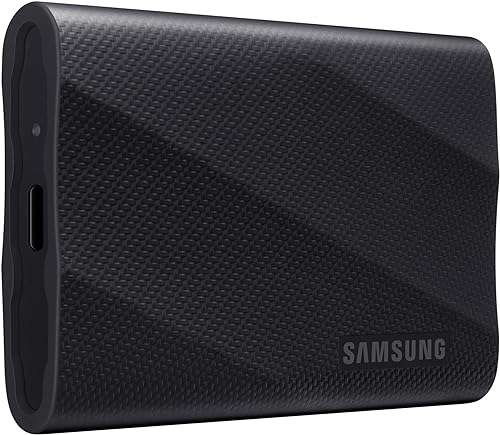
- 1TB capacity
- Up to 2,000 MB/s read and write speeds
- Dynamic Thermal Guard
- USB 3.2 Gen 2x2
The T9 offers stated speeds up to 2,000 MB/s and a thermal solution for longer processes. To reach its maximum speeds, the host and cable must support USB 3.2 Gen 2x2.
Pros
- Fast stated transfer speeds
- Thermal management for longer processes
- Drive health monitoring through Magician software
Cons
- 1TB capacity
- Maximum speeds require compatible host and cables
That maximum speed requires a compatible host and cable, with UASP enabled. If your computer lacks USB 3.2 Gen 2x2, you may not benefit from choosing this model for its top speed.
The 1TB capacity favors a focused working set, not a full archive. Magician software offers firmware updates and drive health monitoring.
Choose it when your computer supports the connection and your current project set fits 1TB. Skip it if your setup cannot use the speed or you need more space; the 2TB version keeps the stated speed class and adds room.
More working room with the 2TB T9
The Samsung T9 Portable SSD 2TB fits photographers with larger active projects and a computer that supports USB 3.2 Gen 2x2. It combines a 2TB capacity with the same stated top speed as the 1TB T9.
Samsung T9 Portable SSD 2TB: Best for fast 2TB workflows
- 2TB capacity
- Up to 2,000 MB/s read and write speeds
- Dynamic Thermal Guard
- USB 3.2 Gen 2x2
This 2TB T9 combines room for active projects with stated transfer speeds up to 2,000 MB/s. Confirm your computer supports Gen 2x2 before paying for that speed class.
Pros
- 2TB capacity for larger working sets
- Thermal management for longer processes
- Hardware encryption
Cons
- Maximum speed depends on host and cable support
- Costs more storage space than an HDD of similar capacity
The extra space can keep more current shoots close at hand, reducing the need to swap drives during a project. It remains a portable SSD for working files, so keep a separate copy of completed images.
Maximum speeds depend on compatible host hardware, cables and UASP mode. Check your computer’s ports before treating the speed as the deciding reason to buy.
Choose this for large active projects when your setup supports Gen 2x2. Skip it if your computer cannot use that connection or you need a broad archive; a larger HDD is a better match for long-term capacity.
A smaller rugged drive for field copies
The LaCie Rugged USB-C 2TB provides portable HDD space for photographers who want to carry a selected set of shoots as a field copy. It has drop, crush and drip protection features, plus hardware encryption and password protection.
LaCie Rugged USB-C 2TB: Best for smaller field archives

- 2TB capacity
- Mechanical hard drive
- IP52 dust and drip protection
- Drop resistance up to 4 ft
A smaller Rugged option for photographers who want a portable HDD with protection features. It includes hardware encryption and password protection.
Pros
- Drop and crush resistance
- USB-C cable and USB 3.0 adapter
- Hardware encryption
Cons
- 2TB capacity is less than the 4TB and 5TB HDD options
- Mechanical drive
The included USB-C cable and USB 3.0 adapter support newer and older computer ports. Its 2TB capacity is smaller than the 4TB and 5TB Rugged choices, so check whether it will hold the folders you plan to carry.
LaCie includes Rescue Data Recovery Services and a 3-year limited warranty. The mechanical drive makes more sense for storing a copy than for a workflow centered on fast editing.
Choose it if you want a compact HDD for selected shoots and value its protection features. Skip it if 2TB will fill quickly; the 5TB LaCie gives more portable space.
A large portable archive for a laptop bag
The WD My Passport 5TB is suited to photographers who need substantial portable storage for completed shoots and backup copies. The drive includes device management software with backup features and password protection with hardware encryption.
WD My Passport 5TB: Best for a large portable archive

- 5TB capacity
- Portable hard drive
- Password protection and hardware encryption
- Backup software with ransomware defense
The My Passport offers 5TB in a slim portable format for storing a large photo library. Its included software supports backup and password protection.
Pros
- Largest capacity among the portable HDD picks
- Backup software included
- Hardware encryption
Cons
- Mechanical drive
- Mac use requires reformatting
Its slim design makes it a portable option, but it is still a mechanical hard drive. For regular editing from the drive, an SSD may suit your workflow better; use this model when capacity and file retention matter more.
The included software supports backup and includes ransomware defense. Mac use requires reformatting, so plan the file system around the computer or computers you use.
Choose it if you want 5TB in a portable HDD and software-assisted backup. Skip it if you want an SSD for quick access to current edits or need a desktop drive’s larger capacity.
An 8TB desktop archive
The Seagate One Touch Desktop 8TB is the best fit here for a large photo archive that stays near a workstation. It offers the highest capacity in this group and connects over USB-C.
Seagate One Touch Desktop 8TB: Best for a desk-based archive

- 8TB capacity
- Desktop HDD
- USB-C connectivity
- Rescue Data Recovery Services
The 8TB desktop drive offers the most capacity in this group for a large archive kept at a workstation. It includes a power adapter and Rescue Data Recovery Services.
Pros
- Highest capacity in this roundup
- USB-C connection
- Rescue Data Recovery Services
Cons
- Larger desktop form factor
- Mechanical drive
This is a desktop HDD, not a pocket drive, and it comes with a power adapter. Set aside a stable place near your computer and leave room for the cable.
Seagate includes Rescue Data Recovery Services and a 2-year limited warranty. The drive is compatible with Windows and macOS.
Choose it when you want a single large archive drive that usually stays at your desk. Skip it if you need storage to carry between shoots; the 5TB LaCie Rugged is portable and includes protection features.
A protected 5TB portable copy
The LaCie Rugged 5TB suits photographers who want a larger portable HDD for field copies and appreciate password protection. It has 256-bit AES hardware encryption, IP52 dust and drip resistance, drop resistance up to 4 ft and 1-ton crush resistance.
LaCie Rugged 5TB with Encryption: Best for a protected 5TB field copy

- 5TB capacity
- Portable mechanical hard drive
- IP52 dust and drip protection
- 256-bit AES hardware encryption
This Rugged drive combines 5TB of portable storage with encryption and resistance features for field use. Its larger capacity suits a second copy of active photo folders.
Pros
- 5TB portable capacity
- Drop, crush and drip protection
- Password protection
Cons
- Mechanical drive
- Check cable compatibility with your computer
The 5TB capacity can fit a broad set of project folders in a portable drive. Its USB-C connection makes cable compatibility worth checking before you head out.
This is a mechanical HDD, so it is best used for carrying or storing copies rather than prioritizing the highest transfer speeds for active editing. Rugged features can help with travel demands, but they do not make a drive a substitute for another copy.
Choose it for portable HDD capacity with encryption and resistance features. Skip it if speed is the priority; use an SSD for active files and keep the LaCie as an archive or backup.
How much external storage do photographers need?
Photographers should size a drive around the files they keep active and how many shoots they retain. A 1TB SSD can suit a focused project set, while 2TB to 5TB gives more room for several projects or portable archives.
Start by checking how much space your photo folders use now. Then estimate how much you add during a busy month, including RAW files, edits, exports, catalogs and video if those share the same drive.
Leave headroom for new shoots rather than buying a drive that is nearly full on day one. Drives fill faster when you keep original files, edited copies and exports together.
For a more detailed capacity decision, use our external hard drive size guide. A broad archive may fit an 8TB desktop HDD, while a travel drive may need to stay compact enough to carry easily.
Is an SSD or HDD better for photo editing?
An SSD is usually the stronger choice for an active editing drive because these SSDs advertise much higher transfer speeds than the HDD options. An HDD can make more sense for storing a large collection when capacity matters more than transfer speed.
The fastest connection on the drive only helps if your computer and cable support it. The Samsung T9’s maximum stated speed needs USB 3.2 Gen 2x2 support, while the T7 Shield and SanDisk Extreme advertise read speeds up to 1,050 MB/s with USB 3.2 Gen 2.
Think about the task, not just the type. An SSD is a practical home for current projects, catalogs or files you open often; an HDD is a reasonable place for completed work that you access less frequently.
If you are comparing storage types for backup, read our guide to SSD vs HDD for backup. Many photographers use an SSD for active projects and an HDD for a separate copy or archive.
How should you set up a new photo drive?
Set up a new drive by checking its file system, giving it a clear name, and making a small test copy before moving your full library. Formatting erases existing files, so first confirm the drive is empty or copy anything you need to keep.
Choose a file system that works with the computers you use. If the drive will move between systems, check compatibility before formatting and decide whether the same drive will be used on a Mac and a Windows PC.
Create a folder structure you can maintain, such as year, project name and file type. Keep RAW originals, edits, exports and catalog files organized so you can find the right copy and know which folders need backup.
Copy files instead of moving them when you first populate the drive. Open a few photos and compare folder sizes before deleting the original files from a camera card or computer.
See our guide to formatting an external hard drive for more help choosing a file system and preparing a drive.
How can you protect a photo archive?
Keep at least two copies of important photos on separate storage, and consider keeping one copy away from your computer. One drive can be lost, damaged or stop working, so a second copy reduces the chance that one problem removes every version.
Use a clear folder system by year, client or project, then verify that files open from the backup drive. Password protection and hardware encryption can help protect sensitive files, but they do not create another copy of your photos.
A simple routine works better than a backup you forget to update. After a shoot, copy the files to your working drive, make a second copy, then check that both copies contain the expected folders.
For a fuller backup plan, see the best way to back up photos. You can also compare a local drive with cloud storage for external hard drive backups.
What mistakes should photographers avoid?
The most common mistake is treating one drive as both the working copy and the only backup. If it fails or goes missing, every photo on it is at risk.
Another mistake is buying for a speed number without checking the computer connection. The Samsung T9’s top speed requires a specific port and cable, so a slower host connection can limit the benefit.
Avoid filling a drive to its limit. Keep room for new shoots, edits and exports, and check available space before a long trip or a large import.
Don’t unplug a drive while files are copying or the editing software is still using it. Close files and safely eject the drive before disconnecting it; our guide explains how to safely eject an external hard drive on a PC or Mac.
Finally, don’t assume rugged protection means the drive is indestructible. Keep portable drives in a padded bag, away from spills, and make a second copy before traveling.
Which external hard drive should a photographer choose?
Choose the Samsung T7 Shield 1TB for a compact field editing drive, the SanDisk Extreme 2TB for more portable SSD space, and the LaCie Rugged USB-C 4TB for a larger protected HDD copy. Pick the Seagate One Touch Desktop 8TB when your archive stays at a workstation.
If your computer supports USB 3.2 Gen 2x2 and you need faster transfers for active projects, consider the Samsung T9 2TB. For a larger portable archive, choose the WD My Passport 5TB or LaCie Rugged 5TB based on whether you prefer software-assisted backup or added protection features.
The best external hard drive for photographers is the one that fits the work you do and the copies you keep. Use an SSD for current files, choose HDD capacity for an archive, and keep important photos on a separate backup too.
A drive is one part of a photo backup plan. Use our external storage guide to compare broader home storage options.
Our top 3 picks at a glance
-
1
-
2
-
3
Frequently asked questions
Should photographers choose an SSD or HDD?
Choose an SSD for a portable working library and faster transfers, especially when you edit directly from the drive. An HDD can offer more capacity for a broad archive.
Either way, keep a second copy of important photos on a separate drive or in another location.
How much external storage do photographers need?
Choose capacity based on the size of your current library and how quickly it grows. A 1TB drive can suit a current project, while 2TB to 5TB gives more room for several shoots.
For a larger archive, an 8TB desktop drive offers more space in one unit.
Can you edit photos from an external hard drive?
Yes, if your computer and editing software can work from external storage. An SSD is usually the better fit for active editing because it has no mechanical disk and the models here advertise higher transfer speeds than the HDDs.
Check the drive connection and cable against your computer.
Is one external hard drive enough to back up photos?
One drive gives you a copy, but it can fail, be lost or be damaged. Keep at least one additional copy on a separate drive or another storage service, and store a backup away from the computer when practical.