9 Best External Hard Drives for a Windows PC (October 2026)
The best external hard drives for Windows PCs include the Seagate Portable 2TB for everyday PC backups, the WD Elements Portable 2TB for plug-and-play PC storage, and the Seagate Portable 4TB for portable 4TB storage.
On this page (8 sections)
- How we chose the best external hard drive for PC
- Compare external hard drives for a Windows PC
- How much external storage should you choose for a Windows PC?
- Is a portable or desktop external hard drive better for PC use?
- What should you check before connecting an external hard drive?
- How should you use and care for a PC backup drive?
- What mistakes should you avoid when choosing a PC hard drive?
- Which external hard drive for PC should you choose?
The Seagate Portable 2TB is the best external hard drive for PC users who want simple, portable storage for files and backups. Choose a larger portable drive for a growing library, Toshiba for Windows-ready NTFS formatting, or Seagate Expansion Desktop for 6TB of storage that stays by your computer.
An external hard drive gives a Windows PC room for extra files and a place to keep a separate copy of documents, photos or videos. The right choice depends on how much space you need, whether the drive will travel, and how you plan to use it.
For a broader comparison of home computer options, see our guide to external storage drives for home computers. If you already know you need more room, our large external hard drive guide covers higher-capacity choices.
Our picks at a glance
-
1

-
2

-
3
How we chose the best external hard drive for PC
The best external hard drive for PC use should fit your storage needs, connection and setup preferences. We compared capacity, Windows compatibility, USB details and useful features such as password protection or a separate power adapter.
We also considered how each drive is set up. Some models describe automatic recognition and drag-and-drop saving, while Toshiba Canvio Basics comes formatted as NTFS for Windows PC.
The scores reflect how well each drive's features match common PC storage needs. A portable 2TB drive scores well for everyday backups, while larger models suit bigger libraries or a fixed desk setup.
Compare external hard drives for a Windows PC
These drives differ most in capacity, portability, file protection and power needs. Use the comparison to narrow the options, then read the product notes for practical setup advice.
| Product | Best for | Capacity | Connection | Cable | Our score |
|---|---|---|---|---|---|
| Seagate Portable 2TB | everyday PC backups | 2TB | USB 3.0 | 18 in USB 3.0 cable included | 8.8 |
| WD Elements Portable 2TB | plug-and-play PC storage | 2TB | USB 3.0 | 8.7 | |
| Seagate Portable 4TB | portable 4TB storage | 4TB | USB 3.0 | 18 in USB 3.0 cable included | 8.6 |
| Seagate Expansion Desktop 6TB | a large desk-side library | 6TB | USB 3.0 | 8.6 | |
| WD My Passport 4TB | password-protected files | 4TB | USB 2.0 / 3.0 / 3.2 Gen 2 | 8.5 | |
| WD Elements Portable 5TB | 5TB portable storage | 5TB | USB 3.0 | 8.4 | |
| Seagate Portable 5TB | a 5TB Seagate portable drive | 5TB | USB 3.0 | 18 in USB 3.0 cable included | 8.3 |
| Toshiba Canvio Basics 4TB | Windows NTFS setup | 4TB | USB 3.0 | 7.8 | |
| Toshiba Canvio Basics 2TB | simple Windows file storage | 2TB | USB 3.0 | 7.7 |
Seagate Portable 2TB: Best for everyday PC backups
- 2TB capacity
- Windows and Mac compatible
- Automatic recognition
- 18 in USB 3.0 cable
This portable 2TB drive supports automatic computer recognition and drag-and-drop file saving. It works with Windows or Mac computers.
Pros
- Automatic recognition
- No software required for setup
- Portable form
Cons
- Less capacity than the 4TB and 5TB picks
- Available storage capacity may vary
The Seagate Portable 2TB suits everyday PC files when you want a drive that's easy to connect and carry. Seagate says it works with Windows or Mac computers and is recognized automatically when connected.
The included 18 in USB 3.0 cable connects the drive to your computer. Setup uses plug-and-play connection and drag-and-drop saving, with no software required.
Its capacity suits a practical backup or a growing collection of photos and documents. Skip it if you already know your video folders or archive need more room than 2TB; move up to a 4TB or 5TB choice instead.
Choose this model for portable storage with straightforward setup. Our Windows 11 external-drive backup guide explains how to turn an external drive into part of a regular backup routine.
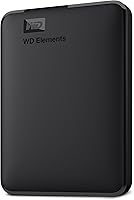
WD Elements Portable 2TB: Best for plug-and-play PC storage
- 2TB capacity
- USB 3.2 Gen 1 / USB 3.0
- Plug and play
- PC platform
This WD drive offers 2TB and plug-and-play expandability for PC use. Its USB connection also supports USB 2.0 devices.
Pros
- Plug-and-play setup
- USB 2.0 and USB 3.0 support
- Portable design
Cons
- Less capacity than larger picks
- Actual transfer speed depends on the connected device
WD Elements Portable 2TB is a straightforward choice for extra PC storage that can travel between a desk and a laptop. It supports USB 3.0 and USB 2.0 devices, and WD describes it as plug-and-play expandability.
The drive is a sensible fit for documents, photos and other files you want to keep off your computer. WD gives the USB 3.2 Gen 1 connection a 5Gbps data rate, though actual transfer speed also depends on your computer and files.
Choose it if you want a basic portable drive and 2TB is enough. Skip it if your main reason for buying is extra room, since the 4TB and 5TB options give you more capacity in one drive.
For more background on this model family, read the WD Elements Portable review.
Seagate Portable 4TB: Best for portable 4TB storage
- 4TB capacity
- Windows and Mac compatible
- Automatic recognition
- 18 in USB 3.0 cable
This portable Seagate drive offers 4TB with automatic recognition and drag-and-drop file saving on Windows or Mac computers.
Pros
- 4TB portable storage
- Automatic recognition
- Drag-and-drop file saving
Cons
- Available storage capacity may vary
- No bundled backup software is specified
The Seagate Portable 4TB gives you more space than the 2TB pick in a drive designed to travel. Seagate describes it as compatible with Windows or Mac computers, with automatic recognition and drag-and-drop file saving.
The included 18 in USB 3.0 cable connects the drive to a computer, and no software is required for setup. The 4TB capacity can suit a larger photo and video collection or a backup set that has outgrown a smaller drive.
Choose this model if you want substantial capacity without a separate desktop power adapter. Skip it if you need only a small set of documents and want to avoid buying space you won't use.
For a closer comparison of portable drive families, read WD My Passport vs Seagate Portable.
Seagate Expansion Desktop 6TB: Best for a large desk-side library

- 6TB capacity
- USB 3.0
- Power adapter included
- Automatic recognition on Windows and Mac
This desktop drive offers 6TB for a home or office file collection. It includes a power adapter and supports drag-and-drop saving.
Pros
- Largest capacity in this group
- Power adapter included
- Automatic recognition on Windows and Mac
Cons
- Needs a separate power connection
- Desktop form
The Seagate Expansion Desktop 6TB fits a home or office PC that stays in one place. It includes an 18W power adapter and an 18 in USB 3.0 cable, so you'll need room near both a USB port and an outlet.
Seagate describes automatic recognition on Windows and Mac computers, with drag-and-drop file saving. At 6TB, this drive suits a large collection of photos, videos, music and documents that you want available at a desk.
Pick it when capacity matters more than carrying the drive around. Skip it if you need to move files between locations or want a drive that runs without a separate power connection.
If a fixed desk setup suits you, compare this model with our guide to the best desktop external hard drives.
WD My Passport 4TB: Best for password-protected files

- 4TB capacity
- Password protection
- Hardware encryption
- Backup software with ransomware defense
My Passport combines 4TB of portable storage with password protection and hardware encryption. Included software provides device management and backup features.
Pros
- Password protection
- Hardware encryption
- Backup software included
Cons
- Software has configuration options
- Backup features use the included software
WD My Passport 4TB is the pick for portable storage with password protection and hardware encryption. Its included device management software has backup features and defense against ransomware.
The drive connects over USB and works with desktop computers, laptops and tablets. Its 4TB capacity gives a larger collection room to grow, while the security features make it a more considered choice for files you don't want freely accessible if the drive is lost.
Choose it if password protection and encryption matter for your files. Skip it if you want the simplest possible plug-in storage and won't use the included software features.
For a direct comparison with the simpler WD option, see WD Elements vs My Passport.
WD Elements Portable 5TB: Best for 5TB portable storage

- 5TB capacity
- USB 3.2 Gen 1 / USB 3.0
- Plug and play
- PC and Mac platforms
This portable WD drive offers 5TB with plug-and-play expandability and USB 3.0 connectivity.
Pros
- 5TB portable capacity
- Plug-and-play setup
- USB 2.0 and USB 3.0 support
Cons
- May be more capacity than a basic backup needs
- No password feature is specified
WD Elements Portable 5TB puts a large library into a portable drive. It supports plug-and-play use and USB 3.0 connectivity, including USB 2.0 devices.
The capacity can suit extensive photo and video folders, older work files or a backup destination with room for future additions. A portable design makes it easier to connect to more than one computer than a desktop drive with a power adapter.
Choose it if you want 5TB and prefer WD Elements' straightforward approach. Skip it if a 2TB or 4TB drive already covers your files, or if password protection is a must-have feature.
For a broader look at 4TB choices, visit our 4TB external hard drive guide.
Seagate Portable 5TB: Best for a 5TB Seagate portable drive
- 5TB capacity
- Windows and Mac compatible
- 18 in USB 3.0 cable
Seagate's portable drive offers 5TB with USB 3.0 connectivity and drag-and-drop file saving for Windows or Mac computers.
Pros
- 5TB portable storage
- Windows and Mac compatibility
- Drag-and-drop saving
Cons
- Available storage capacity may vary
- Setup information does not clearly state whether software is required
Seagate Portable 5TB suits buyers who want a large portable drive from Seagate. It connects over USB 3.0, includes an 18 in USB 3.0 cable, and is described as compatible with Windows or Mac computers.
Seagate describes drag-and-drop file saving. The available setup information is less clear about whether software is required, so use the instructions included with the drive if connection does not work as expected.
Choose it if you want 5TB in a portable form and prefer this Seagate option. Compare it with WD Elements Portable 5TB if you want the same capacity from a different drive family.
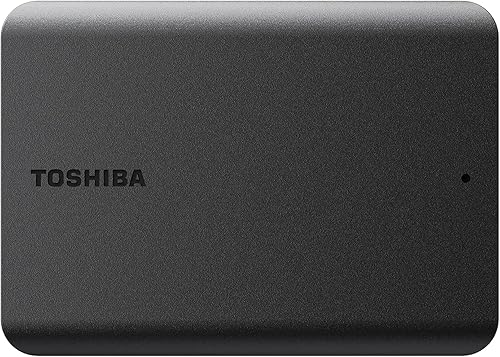
Toshiba Canvio Basics 4TB: Best for Windows NTFS setup
- 4TB capacity
- Pre-formatted NTFS for Windows
- USB 3.0 and USB 2.0 compatible
- No external AC power cord needed
This Canvio Basics model comes formatted as NTFS for Windows PC and needs no software installation. Reformatting is required for Mac computers.
Pros
- Windows NTFS format
- No software installation
- No external AC power cord needed
Cons
- Mac use requires reformatting
- Compatibility can vary by computer setup
Toshiba Canvio Basics 4TB is the Windows-focused pick for a larger file collection. It comes formatted as NTFS for Windows PC, works with USB 3.0 and USB 2.0, and needs no software installation.
It also needs no external AC power cord, which keeps the connection simple. Reformatting is required for Mac computers, so choose it for a Windows PC or for files that will stay within a Windows setup.
Pick this drive if you want 4TB and a Windows-ready file system. Skip it if you need to move files between Windows and Mac without changing the format.
For a separate look at preserving a drive as a backup destination, see our guide to external hard drives for long-term backup.
Toshiba Canvio Basics 2TB: Best for simple Windows file storage

- 2TB capacity
- Pre-formatted NTFS for Windows
- USB 3.0 and USB 2.0 compatible
- No external AC power cord needed
The 2TB Canvio Basics comes formatted as NTFS for Windows PC and needs no software installation.
Pros
- Ready in NTFS format for Windows
- USB 2.0 and USB 3.0 compatible
- No external AC power cord needed
Cons
- Less room than the 4TB Canvio Basics
- Mac use requires reformatting
Toshiba Canvio Basics 2TB is a compact choice for Windows users who need room for documents, photos and a modest media collection. It comes formatted as NTFS for Windows PC and needs no software installation.
Like the 4TB version, it supports USB 3.0 and USB 2.0 and does not need an external AC power cord. Its smaller capacity makes it easier to choose when you have a clear, limited set of files to store.
Choose it for simple Windows file storage when 2TB is enough. Skip it if your folders are already large or you want one drive to hold several years of photos and video.
How much external storage should you choose for a Windows PC?
Choose a drive with enough space for your current files plus a reasonable amount of future growth. The picks here start at 2TB and go up to 6TB.
A 2TB drive works for many everyday file collections, such as documents, photos and some video. If you plan to keep a broad media library or backups from several years, consider 4TB or 5TB so you have room to add files without quickly filling the drive.
The Seagate Expansion Desktop is the only 6TB option in this group and needs its own power adapter. Estimate the folders you plan to copy and compare them with our guide to choosing an external hard drive size.
Avoid choosing only by the number printed on the box. Usable space can be lower than the nominal capacity, and the space you need depends on the size of your files and whether you keep one backup or several versions.
Is a portable or desktop external hard drive better for PC use?
Choose a portable drive if you need to move it or want a simple USB connection. Choose a desktop drive if it will stay near the PC and you want the 6TB capacity offered by the Seagate Expansion Desktop.
The portable Seagate and WD picks suit people who work across a laptop and desktop, or who want to store the drive away when it isn't connected. Toshiba Canvio Basics also avoids the need for an external AC power cord.
A desktop drive takes more planning because it needs a separate power connection. Before buying, check your desk space, outlet access and whether you actually need to carry the drive; if you do, a portable model is the better fit.
What should you check before connecting an external hard drive?
Check the drive's file system, USB connection and setup steps before copying important files. A drive may connect physically but still need a format change for a different operating system.
Toshiba Canvio Basics comes formatted as NTFS for Windows PC and requires reformatting for Mac. Formatting can erase stored data, so check the drive before changing its format and make a copy of any files you need.
On first connection, use a direct USB port on the PC, connect the included cable, and give Windows time to recognize the drive. If it doesn't appear, check the cable and connection before trying another port or changing settings.
After the drive appears, create clearly named folders for the files you plan to store. A simple layout such as “Photos,” “Documents” and “PC Backup” makes it easier to find files later and helps you avoid copying the same folders into several places.
How should you use and care for a PC backup drive?
Treat an external hard drive as one part of your backup plan, not the only copy of important files. Keep a separate copy of anything you can't replace, and connect the drive on a regular schedule so recent files are included.
Avoid unplugging a drive while Windows is writing files. Finish copying, close open files and use Windows' safe removal option before disconnecting the cable.
Keep the drive on a stable surface while it's connected, and store it where the cable won't be pulled or snagged. Portable drives are easier to move, but they still need careful handling; a drop or abrupt disconnect can interrupt a transfer.
What mistakes should you avoid when choosing a PC hard drive?
The most common mistake is buying too little capacity for the files you plan to keep. List the folders you want to store and include room for new files, especially if you keep video or several years of photos.
Another mistake is choosing a desktop drive for a setup where portability matters. The Seagate Expansion Desktop needs a separate power adapter, while the portable options connect by USB and are easier to move.
Don't reformat before checking for files you need or confirming which computers will use the drive. Toshiba's NTFS format is ready for Windows, but Mac use requires reformatting, so a shared Windows and Mac workflow needs extra planning.
Finally, don't assume that buying a drive automatically creates a backup. Set a routine, copy the folders you want to protect, and check that the files are present before deleting originals from your PC.
Which external hard drive for PC should you choose?
Pick the Seagate Portable 2TB for a simple, portable everyday backup; choose WD Elements Portable 2TB for basic plug-and-play storage or Toshiba Canvio Basics 4TB for Windows-ready NTFS capacity. Choose WD My Passport 4TB when password protection matters, or Seagate Expansion Desktop 6TB when the drive can stay at a desk and you need more room.
For a Windows backup routine, follow our guide to backing up Windows 11 to an external drive. If capacity is still the main question, compare the larger choices in our big external hard drive guide.
Our top 3 picks at a glance
-
1
-
2
-
3
Frequently asked questions
What is the best external hard drive for a Windows PC?
The Seagate Portable 2TB is a strong general choice if you want portable storage with automatic recognition and drag-and-drop saving. Choose a larger capacity when your files need more room, or a desktop drive if you want a high-capacity option with its own power adapter.
Check your computer's connection before you buy.
Should I choose a portable or desktop external hard drive?
Choose a portable drive if you want a compact option that connects over USB. The Seagate Expansion Desktop 6TB includes a separate power adapter, so plan for a spot near an outlet.
Think about where you'll keep and connect the drive each day.
Are these external hard drives ready to use with Windows?
Several drives describe plug-and-play setup or automatic recognition on Windows computers. Toshiba Canvio Basics comes formatted as NTFS for Windows PC, while Seagate says its 2TB and 4TB portable drives need no software for setup.
Before formatting a drive, make sure it does not contain files you need.
How much external storage should I get for a PC?
Choose capacity based on the files you plan to keep and the room you want for future additions. These picks range from 2TB portable drives to a 6TB desktop model.
For a closer estimate, see our guide to choosing an external hard drive size.
Can I use one external hard drive for Windows and Mac?
Some picks are described as compatible with both Windows and Mac, but the file system can affect how you use a drive across computers. Toshiba Canvio Basics comes formatted for Windows and requires reformatting for Mac.
Check the format and back up any files you need before switching systems.