9 Best USB-C External Hard Drives (November 2026)
The best USB-C external hard drives include the SSK Portable SSD 500GB External Solid State for speed and everyday backups, the Aiolo Innovation 500GB External Hard Drive Ultra Slim Portable HDD for quiet everyday storage, and the YOTUO 500GB External Hard Drive for consoles and travel.
On this page (5 sections)
The best external hard drive USB-C pick for most people is the SSK Portable SSD 500GB, with read speeds up to 1050MB/s and both USB-C and USB-A cables included. Choose the Aiolo Innovation 500GB for quiet, slim everyday storage, or the LaCie Rugged USB-C 4TB when you need a tough drive with room for large projects.
USB-C has become the default port on new laptops, phones and tablets, so a drive with the right cable matters as much as capacity. The SSK Portable SSD leads this list because it combines real speed with two cables in the box and a body that weighs just 36.6 g.
Our picks at a glance
-
1
 Best for speed and everyday backups
SSK Portable SSD 500GB External Solid State
9.5/10 our score
See it on Amazon -
2
 Best for quiet everyday storage
Aiolo Innovation 500GB External Hard Drive Ultra Slim Portable HDD
9.4/10 our score
See it on Amazon -
3

The best USB-C external drives for every storage need
The SSK Portable SSD is the strongest all-round choice, while each pick below wins for a specific job. Match the drive to how you actually move and store files before comparing small extras.
SSK Portable SSD 500GB External Solid State: Best for speed and everyday backups
- Read up to 1050MB/s, write up to 1000MB/s
- USB-C and USB-A cables included
- Aluminum alloy case
- S.M.A.R.T. and TRIM support
A fast, light SSD with both cable types in the box. Best for frequent transfers and iPhone video capture.
Pros
- Fast 1050MB/s read speed
- USB-C and USB-A cables included
- Light 36.6 g aluminum body
Cons
- 500GB fills quickly with large video
- Does not work with Lightning ports
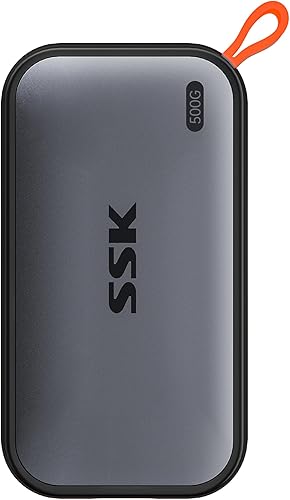
The SSK Portable SSD suits anyone who moves large files often. Its 500GB of solid state storage reads at up to 1050MB/s and writes at up to 1000MB/s over USB 3.2 Gen 2, so a folder of RAW photos or a video clip moves in seconds rather than minutes.
The box includes both a USB-C to C cable and a USB-C to A cable. That means it connects to a modern laptop, a phone, a tablet or an older USB-A port without buying an adapter.
SSK also says the drive handles 4K60 ProRes HDR capture on iPhone, and its power draw stays under 2.4 watts.
The aluminum case is 2mm thick and SSK says the surface peaks around 105.58°F. S.M.A.R.T. health checks and TRIM support help it hold speed over time.
SLC caching sets aside 25% of free capacity as high-speed cache, so transfers inside that space stay steady at 10Gbps. The drive ships in exFAT, ready for Windows and Mac.
Its main trade-off is capacity. 500GB is fine for documents and everyday backups but tight for a video editor storing full projects.
If you need more room, look at the 4TB LaCie below.
Pick it for speed, light travel weight and a single cable that fits most devices. It is the easiest recommendation here for most buyers.
Aiolo Innovation 500GB External Hard Drive Ultra Slim Portable HDD: Best for quiet everyday storage
- USB 3.0 with USB-C adapter
- Noise-free design
- Aluminum anti-interference layer
- Three-year manufacturer warranty
A slim, quiet HDD with a USB-C adapter in the box. Best for documents, photos and office backups.
Pros
- Quiet operation
- USB-C adapter included
- Three-year warranty
Cons
- HDD speeds well below an SSD
- 500GB only
The Aiolo Innovation 500GB is the best choice for quiet, slim storage. Its mechanical drive reads at a theoretical 110 to 133MB/s and writes at up to 103MB/s, which is plenty for documents, photos and office backups.
What sets it apart is the noise-free design. Aiolo builds the drive with an aluminum and glass enclosure and an internal anti-interference layer, so it stays quiet on a desk next to you.
The body is slim enough to slip into a laptop bag. The cable uses thickened copper for a steadier connection, and the internal foil shielding reduces outside interference.
The package includes a USB 3.0 cable and a USB-to-Type-C adapter, so the drive connects to both older and newer ports. Aiolo backs it with a three-year manufacturer warranty and free technical support.
The trade-off is speed. A mechanical drive at these speeds takes noticeably longer than the SSK SSD for large video files or game installs.
Capacity is also 500GB, matching the SSK.
Choose it for a quiet desk drive that handles everyday files without fan noise or bulk. It suits students, office workers and home users who value silence over raw speed.
YOTUO 500GB External Hard Drive: Best for consoles and travel
- USB 3.0 and USB-C
- Silicone shock sleeve
- Plug and play
- Weighs 0.16 kg
A light HDD with a silicone sleeve. Best for moving last-gen games and files between devices.
Pros
- USB-C and USB 3.0
- Shock-absorbing sleeve
- Very light at 0.16 kg
Cons
- 500GB limits a game library
- PS5 and Xbox Series X games cannot run from it
YOTUO's 500GB drive is built for consoles and travel. It weighs just 0.16 kg and its silicone sleeve cushions the drive against bumps in a bag.
The mirror-and-frosted finish gives it a clean look.
The connection covers USB 3.0 and USB-C, so it moves between a laptop and a console without fuss. YOTUO states you can store and play PS4 and Xbox One games directly from the drive, freeing internal space for newer titles.
The drive runs at 7200 rpm with 8GB of cache, which helps it reach the upper end of mechanical speeds for moving game files.
The catch is the same one every portable HDD shares: PS5 and Xbox Series X|S games cannot run or be stored directly from the drive. You only get the benefit for last-gen titles.
Capacity also caps out at 500GB. A first-time console setup needs a format before the drive is recognised.
Buy it if you shuttle last-gen games between a console and a PC and want a drive that shrugs off knocks. For pure speed, the SSK SSD is the better pick.
WD Elements Portable 2TB: Best for simple big storage

- 2TB capacity
- USB 3.2 Gen 1
- Plug and play
- Lightweight design
A 2TB portable HDD for photos, video and backups. Best for storage volume on a budget.
Pros
- 2TB capacity
- USB 3.2 Gen 1
- Simple plug and play
Cons
- Mechanical drive is slower than an SSD
- USB-A cable only
The WD Elements Portable 2TB is the straightforward volume pick. It holds twice the capacity of the 500GB drives here, so photos, music and document backups fit with room to spare.
WD uses SuperSpeed USB 3.2 Gen 1 at 5Gbps. The drive is plug and play, and its lightweight design makes it easy to keep in a bag or drawer.
WD describes it as a companion for backing up photos, videos and files on the go. The drive is a 5400 rpm mechanical model, and the box adds a USB 3.0 cable and a quick install guide.
This is a mechanical drive, so it reads and writes well below the SSK SSD's speed. It also ships with a USB-A cable, so a USB-C-only laptop needs an adapter.
The upside is capacity per dollar at the budget end.
Pick it when you want simple, large storage and don't need SSD speed. It is a solid choice for a first external drive or a photo archive.
For a desktop setup with more room and cooling, our guide to the best desktop external hard drive covers larger options.
LaCie Rugged USB-C 4TB: Best for fieldwork and high capacity

- 4TB capacity
- Drop, dust and rain resistant
- 256-bit AES hardware encryption
- USB-C cable and USB 3.0 adapter
A tough 4TB drive for creators working outdoors. Best for large projects that travel.
Pros
- 4TB capacity
- IP52 dust and drip protection
- Hardware encryption
Cons
- Heavier and bulkier than slim HDDs
- Premium price tier
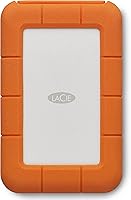
The LaCie Rugged USB-C 4TB is the drive for fieldwork. It stores 4TB of high-resolution photos, video and project files in a compact body, and LaCie rates it for drops up to 4 ft, IP52 dust and drip protection and 1-ton crush resistance.
The orange rubber bumper wraps an aluminum and polycarbonate shell.
Built-in 256-bit AES hardware encryption and password protection keep sensitive files safe if the drive is lost or stolen. The package includes a reversible USB-C cable and a USB 3.0 adapter for older ports.
LaCie also includes Rescue Data Recovery Services and a three-year limited warranty. The drive comes with a one-month Adobe Creative Cloud All Apps membership.
The speed is USB-C 5Gb/s on a 5400 rpm mechanical drive, so it is slower than the SSK for big transfers. It is also heavier and bulkier than the slim drives here.
Choose it for travel to shoots, job sites or anywhere a drive might take a knock. Photographers who need capacity and toughness will get the most from it; see our roundup of the best external hard drive for photographers for more picks.
YOTUO 1TB External Hard Drive: Best for laptop port limits
- 1TB HDD plus 7-in-1 hub
- SD and TF card readers
- USB-C and USB 3.2 cable
- Works with iPhone 15 and later
A 1TB drive and docking hub in one. Best for laptop users short on ports and card readers.
Pros
- Built-in SD and TF readers
- USB-C and USB 3.2 cable
- 1TB capacity
Cons
- Hub adds bulk
- Lightning adapters do not work
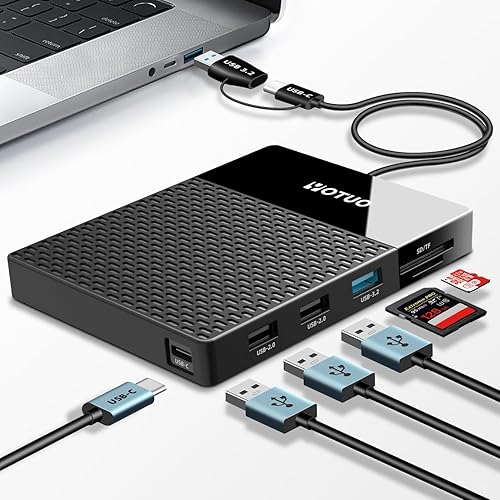
The YOTUO 1TB External Hard Drive solves a different problem: too few ports. It combines a 1TB HDD with a 7-in-1 hub that adds an SD card reader, a TF card reader and extra USB ports, so a laptop with one USB-C slot gains storage and connectivity together.
YOTUO lists 6 ports in total, 4 of them USB.
The included dual-socket cable covers USB 3.2 and USB-C. YOTUO says it works with Windows 7 and later, Mac, Linux, Android and iOS, including iPhone 15 and later.
The drive also supports TVs and tablets. A DC-5V power cable port is there for devices with weak power output, though most setups do not need it.
The hub is the reason to buy it. Photographers can pull an SD card and copy files to the drive without a separate reader.
Office users can plug in a mouse or phone at the same time.
The trade-off is bulk and cable complexity. It is a larger unit than a plain pocket drive, and YOTUO notes that Lightning adapters do not solve compatibility with older iPhones.
Speed is HDD-level, and the drive draws up to 5 watts.
Pick it for a laptop desk setup where one port has to do everything. If you only need storage, a simpler drive like the Kosbees is easier to carry.
Kosbees 500 GB External Hard Drives: Best for basic plug-and-play backups

- USB 3.0 cable
- Ultra-slim plastic body
- Plug and play
- Works with PS4 and Xbox One
A simple, slim HDD for light backups. Best for students and home users who need basic storage.
Pros
- Very slim body
- Plug and play
- Read speeds up to 133MB/s
Cons
- USB-A cable only
- 500GB fills fast
The Kosbees 500GB is the basic plug-and-play option. It is 0.55 inches thick and weighs 0.35 lb, so it disappears into a bag.
The USB 3.0 cable moves files at a theoretical 110 to 133MB/s read and up to 103MB/s write.
Kosbees says the drive works with PS4, PS5, Xbox One, Windows, Linux and Mac, and that no software is needed on Windows. Mac users need to format it to exFAT first.
The premium ABS enclosure has internal shock design for everyday durability. The package is just the drive, a quick start guide and the USB cable.
It is a good fit for students, families and anyone who wants a cheap extra drive for schoolwork or photos. It handles PS4 and Xbox One games too.
For PS5 and Xbox Series X|S titles, the games must be copied to the console's internal SSD first.
The limits are real: the cable is USB-A only, so a USB-C laptop needs an adapter, and 500GB fills quickly with video. Speed is mechanical, not SSD.
The warranty runs one year. For more room in the same format, the WD Elements 2TB offers double the capacity.
Buy it for light, low-cost backups where a USB-A port is available. Our best 4TB external hard drive roundup is the next step if you need serious capacity.
WD My Passport 2TB: Best for backup software and security

- 2TB capacity
- Backup software with ransomware defense
- Password protection and hardware encryption
- Three-year warranty
A 2TB HDD with backup software and hardware encryption. Best for buyers who want security built in.
Pros
- 2TB capacity
- Hardware encryption and password protection
- Three-year warranty
Cons
- USB-A cable only
- Backup software needs a download
The WD My Passport 2TB adds backup software and security to the familiar portable HDD formula. It holds 2TB and ships with device management and backup software that WD says defends against ransomware.
Password protection and hardware encryption help keep files safe if the drive goes missing. WD backs it with a three-year limited warranty.
The aluminum-bodied design is slim enough to fit in a palm, so it travels easily. The package includes a SuperSpeed USB-A cable at 5Gbps and a quick start guide.
The drive uses USB 3.0 with a USB-A cable. Speed is mechanical, well under the SSK SSD.
The backup software needs a download and an account registration before it will run.
It suits buyers who want a set-and-forget backup routine and don't want to think about file safety. The software does the scheduling; you just plug the drive in.
If you would rather skip the software and manage copies yourself, a plain drive like the WD Elements is simpler.
Choose it when security and built-in backup matter more than raw speed. If you prefer a Windows-focused setup, our guide to the best external hard drive for PC covers more options.
Seagate Portable 1TB: Best for cheap everyday storage

- 1TB capacity
- USB 3.0 cable
- Plug and play
- One-year Rescue Service
A 1TB HDD that works with PC, Mac and consoles. Best for a low-cost extra terabyte.
Pros
- 1TB capacity
- Works with PC and Mac
- Included 18-inch USB 3.0 cable
Cons
- USB-A cable only
- No encryption software
The Seagate Portable 1TB is the low-cost everyday drive. It stores 1TB of content and works with Windows, Mac, PlayStation and Xbox.
Seagate says setup is drag and drop with no software needed, and the drive is recognised automatically when plugged in.
The package includes an 18-inch USB 3.0 cable. The drive is compact and simple, which makes it a common first external drive.
Seagate adds a one-year Rescue Service for data recovery help. The drive is a 7200 rpm mechanical model.
It is USB 3.0 only. It has no encryption software and no USB-C cable, so newer laptops need an adapter.
Capacity is 1TB, less than the WD Elements 2TB. Mac users may need to reformat the drive before first use.
Pick it when the lowest cost per terabyte is the goal and your laptop still has USB-A. For a USB-C setup with more protection, the LaCie or YOTUO 500GB fits better.
The Seagate is the simplest way to add a terabyte without extras.
How these USB-C drives compare
Start with the connection first. A drive with only a USB-A cable will need an adapter on a USB-C-only laptop.
The SSK, Aiolo Innovation, YOTUO 500GB and LaCie all include USB-C or adapter options in the box. The WD Elements, WD My Passport and Seagate ship with USB-A cables.
Then weigh speed against capacity. An SSD like the SSK reads at up to 1050MB/s; mechanical HDDs here read around 103 to 133MB/s.
If you move video or large photo batches often, the speed gap is worth the smaller capacity. If you archive files and rarely move them, a 2TB HDD gives more room.
Where each drive fits
The 500GB group splits four ways. The SSK SSD is for speed and phone video.
The Aiolo is for quiet desk use. The YOTUO 500GB is for consoles and bags.
The Kosbees is the plain budget pick.
The 1TB and 2TB drives trade speed for room. The YOTUO 1TB hub adds ports.
The WD Elements and My Passport add volume. The Seagate adds the cheapest terabyte here.
The LaCie sits apart. It is the only drive rated for drops, dust and rain, and the only one with 4TB in this list.
Its encryption and recovery service make it the field-work pick.
What the interface labels mean
USB 3.2 Gen 2 supports up to 10Gbps and is what the SSK SSD uses to reach its 1050MB/s read speed. USB 3.2 Gen 1, also sold as USB 3.0, supports 5Gbps.
Every HDD here runs on USB 3.0, so its real ceiling is the drive's own mechanical speed, not the cable.
That matters when you compare a drive's listed transfer rate with its interface. The YOTUO 500GB lists a 150Gbps figure that describes the port standard, not what the drive sustains.
Check the read and write numbers for a realistic picture.
How we compared these USB-C external drives
We compared the specs each brand publishes, the cables and adapters included in the box, and how each drive's features fit common jobs. Our score weighs specs, features and the fit with what a USB-C shopper needs: speed for large files, capacity for storage, protection for travel and connections for older and newer devices.
Every score here sits between 7.9 and 9.5. The SSK SSD tops the list because it pairs the fastest read speed with both cable types and a light body.
Drives with USB-A-only cables and 1TB or 500GB capacity land lower, because they need an adapter or fill quickly. A drive's score also reflects what it offers beyond storage, such as the LaCie's protection or the YOTUO hub's extra ports.
What should you check before buying a USB-C external hard drive?
Check three things first: the cables in the box, the interface speed and the capacity you really need. A drive with a USB-C cable connects to modern laptops and phones; one with only USB-A needs an adapter.
Interface speed decides how fast your files move, so match it to your laptop's fastest port. Capacity decides how soon you'll need another drive.
How much speed do you need?
If you edit video or move large photo batches, choose an SSD like the SSK Portable SSD. Its 1050MB/s read speed keeps projects moving.
If you back up documents and photos a few times a week, a mechanical drive at 103 to 133MB/s is enough and costs less per terabyte. For game storage on a console, either type works for last-gen titles.
Should you pick an SSD or an HDD?
An SSD is the better pick when speed and light travel matter. It has no moving parts and the SSK weighs just 36.6 g.
An HDD is the better pick when you need more capacity for the money and speed is secondary. The WD Elements 2TB and LaCie Rugged 4TB hold more than the 500GB SSDs here.
The SSK's SLC cache keeps transfers steady, while an HDD's speed depends on its spinning platters.
Which cable comes in the box?
The SSK Portable SSD includes both USB-C to C and USB-C to A cables. Aiolo Innovation includes a USB 3.0 cable and a USB-C adapter.
The LaCie Rugged USB-C includes a USB-C cable and a USB 3.0 adapter. The YOTUO 1TB hub includes a dual-socket USB 3.2 and USB-C cable.
The WD Elements, WD My Passport and Seagate Portable ship with USB-A cables only.
Will the drive work with a phone or tablet?
It depends on the port. The SSK Portable SSD and YOTUO 1TB hub work with USB-C phones and tablets, including iPhone 15 and later.
Drives with only USB-A cables need an adapter, and a Lightning-to-USB-C adapter will not make an older iPhone compatible.
The SSK also supports 4K60 ProRes capture from a USB-C iPhone, and its low 2.4W draw suits mobile use.
Which USB-C external hard drive should you buy?
For most buyers, the SSK Portable SSD 500GB is the best external hard drive USB-C option, because it delivers 1050MB/s speed and both cable types without adding an adapter. Pick the Aiolo Innovation 500GB if quiet, slim storage matters more than speed.
Choose the LaCie Rugged USB-C 4TB if you work in the field and need 4TB plus drop and dust protection. The YOTUO 1TB hub is the pick when one port has to do everything.
Buyers who need more capacity for less can start with the WD Elements 2TB or our best desktop external hard drive guide.
Our top 3 picks at a glance
-
1
Best for speed and everyday backups
SSK Portable SSD 500GB External Solid State
9.5/10 our score
See it on Amazon -
2
Best for quiet everyday storage
Aiolo Innovation 500GB External Hard Drive Ultra Slim Portable HDD
9.4/10 our score
See it on Amazon -
3
Frequently asked questions
Do USB-C external hard drives work with older USB-A ports?
Many do, but only when the drive includes a USB-A cable or adapter. The SSK Portable SSD, Aiolo Innovation and YOTUO 500GB drives all ship with the cable or adapter you need.
Check the box contents before ordering a USB-C drive for a USB-A laptop.
Is a portable SSD or a portable HDD better for travel?
A portable SSD is the better travel pick when speed and weight matter, since the SSK drive weighs just 36.6 g and has no moving parts. A portable HDD offers more capacity for the money.
The LaCie Rugged USB-C 4TB adds drop, dust and rain protection for outdoor work.
Can I run PS5 or Xbox Series X games from a USB-C external hard drive?
No. PS5 and Xbox Series X|S games must run from the console's internal storage.
You can store PS4 and Xbox One games on a USB-C external hard drive and play them from it.
YOTUO states this limit for its 500GB drive.
Why does a 500GB drive show less than 500GB in Windows?
Windows uses binary math, so it reads 500GB as about 465GB. macOS reads the same drive as the full 500GB. The difference is how each system counts a gigabyte, not lost space.
SSK, YOTUO and Kosbees all note this difference.
What speed should I look for in a USB-C external hard drive?
Look for USB 3.2 Gen 2 if speed matters, since it supports up to 10Gbps and the SSK SSD's 1050MB/s read speed. A USB 3.0 HDD typically reads around 110 to 133MB/s.
Match the interface to your computer's fastest USB-C port to get the most speed.
Does a USB-C external hard drive need formatting before first use?
Often yes. The SSK SSD ships in exFAT, which works with Windows and Mac.
Aiolo Innovation and Seagate note that Mac users may need to reformat.
Back up anything already on the drive before you change its format.