Can an External Hard Drive Be Fixed?
Yes, many external hard drive problems can be fixed, but not all of them. Cables, ports, formatting and file system errors are repairable; a drive that clicks or spins up and down on its own needs professional data recovery.
On this page (9 sections)
- What kinds of external hard drive problems can be fixed?
- How do you tell a cable or port fault from a failed drive?
- Can formatting or a repair tool bring a drive back?
- Can you fix an external hard drive that won't power on?
- What does a repair cost in time and effort?
- When is replacing the drive the better move?
- Can a password lock cause a drive to look broken?
- How do you stop the next drive from failing?
- What should you do first when your drive stops working?
Yes, many external hard drive problems can be fixed, but not all of them. Cables, ports, formatting and file system errors are repairable at home; a drive that clicks or spins up and down on its own needs professional data recovery.
The key question when asking can an external hard drive be fixed is what kind of fault you have. A dropped drive and a corrupted folder look similar from the outside but need very different responses.
This guide splits the fixable problems from the ones where the safest move is to stop and hand the drive to a lab.
What kinds of external hard drive problems can be fixed?
Cable, port, driver and file system faults are the fixable ones. These make up most "dead drive" cases, and each has a clear set of checks you can run without opening the case.
Start with the cheapest item. A worn USB cable, a loose plug or a hub that can't supply enough power will make a healthy drive vanish mid-copy.
Swap the cable and try a port directly on the computer before assuming the drive is gone.
Software faults sit in the same group. An unreadable drive that shows up in Disk Management often has a corrupted file system or a damaged partition table, and formatting or a repair tool can clear that.
Physical faults are the other group: a dropped drive, a grinding motor or a head that keeps parking and unparking. Those are the cases where more attempts reduce your chances of getting data back.
The split matters because the fix for one group can destroy the other. Running a repair on a clicking drive is the most common way people lose files that a lab could have recovered.
How do you tell a cable or port fault from a failed drive?
Swap one part at a time and watch whether the drive appears. Change the cable first, then the port, then the computer.
If the drive shows up after any one of those swaps, the drive itself is fine.
Use a port on the laptop or desktop body rather than a hub or a monitor's USB socket. Bus-powered portable drives draw all their power from that port, and a weak hub is a frequent cause of dropouts.
Listen while the drive is connected. A quiet spin and a steady light mean the electronics are working.
Silence, a repeating click or a light that flickers on and off points to the drive or its power board.
Try a second computer if you have one. A drive that opens on another machine is not failing; the original computer's port or driver is the problem.
For a clicking drive, stop here and read our guide to why is my external hard drive clicking before trying anything else.
Can formatting or a repair tool bring a drive back?
Yes, when the drive is detected but won't open. Formatting rebuilds the file system so Windows or macOS can read the drive again.
It erases everything on it, so copy any files you still need first.
Check Disk Management in Windows or Disk Utility on a Mac to see whether the drive appears with a capacity. If it does, the hardware is probably alive and the fault sits in the file system.
Run the operating system's own check first. Windows offers an error-checking tool, and macOS has First Aid in Disk Utility.
Both attempt repairs without erasing data.
A full format is the last step, not the first. If the drive won't mount and holds nothing you need, format it and start fresh.
Our guide on do external hard drives need to be formatted covers when formatting is required, including the Mac and Windows file system differences that trip people up.
When should you stop and call a recovery service?
Stop at once if the drive clicks, beeps or isn't detected anywhere. These are mechanical symptoms, and every extra attempt pushes the read head closer to the platters.
A dropped drive counts too, even if it still appears. The heads can scratch the surface on the next spin.
Unplug it and keep it still until a lab takes it.
Skip the freezer trick and DIY software recovery on a physically failing drive. Neither fixes the hardware, and both add risk.
A recovery service works in a clean room with the drive opened properly.
Can you fix an external hard drive that won't power on?
Sometimes, by replacing the cable or the power adapter. Portable drives have no separate power brick, so a dead cable is a real possibility.
Desktop drives with an external adapter are easier to test: borrow a matching adapter and see if the drive spins.
Check the light first. No light and no sound at all is usually a power path problem rather than a dead disk.
Try another outlet and another cable before deciding.
Portable drives are harder. The USB port on the case can fail while the drive inside is fine.
Many have the USB bridge built into the board, so a plain enclosure swap won't work. Ask a recovery service when the data matters.
What does a repair cost in time and effort?
Home fixes are cheap and fast; lab recovery is expensive and slow. A new cable or a format takes minutes.
Clean-room recovery runs into hundreds of dollars and days or weeks.
Work through the free checks first: cable, port, second computer, error-checking tool. Most drives are readable again after one of them.
If those fail and the drive is physically healthy, a format costs you the data but little else. If the drive is failing and the files matter, budget for a lab rather than buying tools that promise to fix hardware.
The money question changes the decision. A drive holding family photos is worth a recovery quote.
A drive holding a copy of files you still have elsewhere is not.
When is replacing the drive the better move?
Replace when the drive is old, failing or too small for your backups. A repair buys time; a new drive gives you a clean start and a second copy.
Age matters. Mechanical drives wear out over years of use, and a drive that's already dropping out is not a safe place for your only copy.
Our guide to how long do external hard drives last explains the signs of end of life.
Size matters too. If the drive is nearly full, backups stop completing and errors look like failures.
A larger drive solves that without any repair.
When you replace, keep the old drive until the new one holds a complete copy. That way a failed transfer doesn't cost you the files you were trying to save.
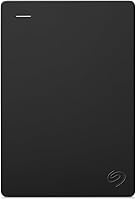
The Seagate Portable 2TB is the simple replacement for a dead desktop drive. It's a mechanical 2TB model with a USB 3.0 interface and plug-and-play setup for both Windows and Mac.
Our score weighs its specs, features and fit against what a replacement buyer needs.
Can a password lock cause a drive to look broken?
Yes, an encrypted or locked drive can appear unreadable until the password is entered. Some drives ship with hardware encryption and ask for a password before the files show.
Check for a small app or a button on the drive first. A drive that asks for a password on another computer is working as designed.
If you set a password and forgot it, no repair tool will open the drive. The maker's support pages explain the reset options, which usually erase the drive.
Our guide on how to password protect an external hard drive covers the lock features and what to do if you lose access. Set the password only after you've copied the files somewhere else.
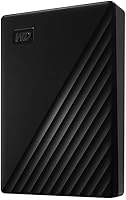
The WD Elements Portable 2TB works as a straight swap for a drive that has stopped mounting. It's a 2TB mechanical drive with USB 3.2 Gen 1 and no software to install.
The score reflects its specs and how well it suits a reader who just wants their files readable again.
How do you stop the next drive from failing?
Keep it cool, still and backed up. Most failures come from knocks, heat or a single copy of the data.
Handle the drive flat and let it stop spinning before you unplug it. Don't move a laptop with the drive plugged in and running.
Keep it out of direct sun and off soft surfaces that block airflow. A portable drive in a bag is fine when it's powered down.
The real safeguard is a second copy. A repaired drive is still an old drive, so keep your important files on two separate devices.
The Toshiba Canvio Basics 2TB arrives pre-formatted in NTFS for Windows and needs reformatting for a Mac. It's a 2TB mechanical drive with USB 3.0 and no external power cord.
The score weighs its specs against the needs of a reader adding a backup copy.
What should you do first when your drive stops working?
The order is simple: check the cable and port, try another computer, then decide. If the drive appears and opens, copy your files off before you repair anything.
If it doesn't appear at all, listen for clicks. A silent or clicking drive goes to a recovery service, not a repair tool.
A drive that appears but won't open is the case for error-checking and, as a last step, a format.
That answers can an external hard drive be fixed in practice. Most drives can, as long as you treat the data as the priority and the hardware as replaceable.
For the setup side, read do external hard drives need to be formatted before you plug in the replacement.
Frequently asked questions
Can a dead external hard drive be repaired?
Sometimes. If the drive doesn't spin or light up, the enclosure's power board or USB port may be the fault, and swapping the drive into a matching enclosure can bring it back.
A drive that's completely silent after a fall is usually a hardware failure that needs a recovery lab.
Does reformatting fix an external hard drive?
It fixes file system and corruption errors that make the drive unreadable in Windows or on a Mac. It does not repair mechanical faults.
Reformatting wipes the drive, so copy anything you still need first.
How do I know if my external hard drive is failing?
Repeated clicking, a drive that disappears mid-copy, very slow transfers and repeated 'file is corrupted' messages are the usual warning signs. Back up at once and stop writing to the drive when these appear.
Can I fix an external hard drive myself?
Yes for cables, ports, drivers, formatting and file system errors. No for a clicking or dropped drive, because opening the case or running repair tools can destroy the platters.
Send those to a data recovery service.
Is my data lost if the external hard drive won't open?
Not necessarily. A drive that's recognised in Disk Management but won't mount often still holds readable files.
A drive that isn't detected at all may have lost access to the data rather than the data itself.