How Long Do External Hard Drives Last?
External hard drives often last about 3 to 5 years, but there is no fixed lifespan. The best way to protect files is to choose a drive for your use, handle it carefully, and keep a second copy.
On this page (10 sections)
- How long do external hard drives last in everyday use?
- How long do external hard drives last if unused?
- What affects an external hard drive's lifespan?
- How should you choose a drive for its expected lifespan?
- How can you make an external hard drive last longer?
- What are signs an external hard drive may be failing?
- When should you replace an external hard drive?
- Is an SSD better than an HDD for long-term storage?
- How should you protect files as a drive ages?
- How long do external hard drives last, and what should you choose?
External hard drives often last about 3 to 5 years, but no calendar date predicts when a particular drive will fail. If you're asking how long external hard drives last, use that range as a planning estimate and protect important files with another copy.
A drive may work for less time or for many years beyond that estimate. Choose storage that fits how you use it, keep it in good conditions, and replace it when recurring problems make it unreliable.
How long do external hard drives last in everyday use?
Many external hard drives work for several years, often around 3 to 5. Frequent movement, bumps, heat, and problems with a cable or power connection can increase the risk of trouble.
A portable mechanical drive has moving parts. Set it on a stable surface while it runs, and avoid shaking or moving it during file transfers.
An SSD stores data on flash memory instead of spinning disks. That removes some mechanical parts, but an SSD can still fail from damage, wear, or electronic faults.
How long do external hard drives last if unused?
An unused drive can still fail, and stored files aren't guaranteed to remain safe indefinitely. A drawer protects a drive from everyday handling, but age and storage conditions still matter.
Store backup drives in a cool, dry place away from direct sun, liquids, and heavy objects. Connect them periodically and check that important files are still readable.
Don't let an old, disconnected drive become your only copy of photos or documents. Keep another copy on a separate drive or backup service, and refresh it as your files change.
What affects an external hard drive's lifespan?
Heat, physical shocks, frequent movement, and power or cable problems can all affect reliability. Careful handling can reduce avoidable risks, but no habit guarantees a fixed number of years.
A drive that travels between rooms or computers is more likely to be bumped or tugged than one kept in place. Put it somewhere stable before use, and leave enough slack in the cable to prevent accidental pulls.
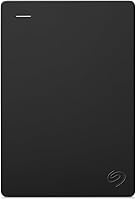
For a computer drive you may move around, the Seagate Portable 4TB is a portable mechanical option designed for Windows or Mac computers. Its included 18 in USB 3.0 cable supports a simple computer connection.
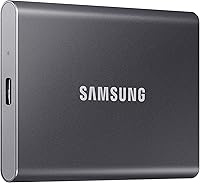
If your drive will travel often, consider whether an SSD's lack of moving parts and added physical protection suit your routine. The Samsung T7 Shield Portable SSD 1TB has IP65 water and dust resistance and drop resistance under controlled conditions.
Its resistance ratings don't make it waterproof in every situation or remove the need for a backup. Keep it away from liquids and follow its care instructions.
How should you choose a drive for its expected lifespan?
Choose based on how you will use the drive and what you need to store, not on a promise of a certain lifespan. Consider capacity, travel, computer compatibility, and whether you can keep a second copy.
A portable HDD makes sense if you want a large amount of storage in a drive you can carry between computers. It may not suit a routine with frequent bumps or movement while files are transferring.
The Toshiba Canvio Basics 4TB is a portable mechanical option for adding storage to a compatible computer. It works with USB 3.0 and USB 2.0, and comes formatted for Windows; Mac computers require reformatting.
An SSD can be a better fit for frequent travel or work with large files when transfer speed and resistance to drops, dust, or water matter. It may be a poor fit if you need more capacity than the 1TB Samsung option provides.
If you mainly need extra room for files at home, a portable drive may be convenient, while a desktop drive may better fit a permanent setup. Compare external hard drives for long-term backup if the drive will serve as part of a backup plan.
How can you make an external hard drive last longer?
Handle it gently, keep it dry and cool, and disconnect it safely. These habits reduce avoidable wear, though they can't guarantee how long the drive will work.
- Place a mechanical drive on a stable surface while it runs.
- Keep cables from bending sharply, stretching, or getting pulled.
- Keep liquids, direct heat, and heavy objects away from the drive.
- Use your computer's safe-eject option before unplugging.
- Keep more than one copy of files you can't replace.
Follow a safe-eject routine on a PC or Mac before disconnecting. Pulling the cable during a transfer can interrupt file operations and leave you unsure whether a copy finished.
What are signs an external hard drive may be failing?
Repeated errors, unexplained disconnections, unusually slow access, or new mechanical sounds can signal trouble. If you can still read files, copy them to another drive or backup service promptly.
One slow transfer or a loose cable doesn't prove the drive itself is failing. If safe to do so, try a different cable or port, then see whether the same problem returns.
Clicking or grinding from a mechanical drive deserves attention, especially if the sound is new. Stop unnecessary use and read why an external hard drive clicks before troubleshooting further.
For more warning signs and next steps, see how to tell if an external hard drive is failing. Avoid repeatedly reconnecting a drive that makes concerning sounds or keeps dropping out.
When should you replace an external hard drive?
Replace a drive when recurring faults make it hard to trust with your files. Move or copy important files before the drive stops working, if you can still access them.
Age by itself isn't a replacement rule. If a drive is several years old and holds important files, check that the files open and make a fresh backup before relying on it.
When moving to a replacement, copy your files and verify that the new versions open before retiring the old drive. A backup protects you while you make that switch.
Is an SSD better than an HDD for long-term storage?
Neither an SSD nor a mechanical HDD should be the only place you keep important files. The right choice depends on your capacity needs, how often you travel with it, and the type of backup you maintain.
The SSD vs HDD backup comparison explains the main tradeoffs. A portable HDD can be a practical fit for capacity, while an SSD can suit frequent travel and work that benefits from faster transfers.
Whichever type you choose, keep a separate copy of important files. Set a backup schedule that matches how often your files change, then check that copies can be opened.
How should you protect files as a drive ages?
Keep at least one additional copy of important files on a separate device or backup service. That way, one damaged or failing drive doesn't erase your only copy.
A backup plan matters more than guessing how many years remain. If you use Windows 11, follow how to back up Windows 11 to an external drive; for photos, see the best way to back up photos.
How long do external hard drives last, and what should you choose?
Plan for several years, often about 3 to 5, but don't rely on age estimates to protect your files. Pick a portable HDD such as the Seagate or Toshiba if you need 4TB of portable storage; choose the Samsung SSD if travel protection and fast transfers matter more and 1TB is enough.
Whichever you buy, keep it stable, cool, and dry, eject it safely, and maintain a second copy. Replace it when faults recur, and move your files while the drive is still readable.
Frequently asked questions
How long do external hard drives last if unused?
An unused external hard drive can still fail, and there isn't a reliable number of years that guarantees stored files will remain safe. Keep it in a cool, dry place, check it periodically, and keep another copy of important files on a separate drive or backup service.
Should I replace an external hard drive after 5 years?
Not automatically. Age alone doesn't tell you whether a drive is failing.
An older drive deserves closer monitoring and a current second backup.
Replace it if it shows errors, disconnects, unusual sounds, or other new problems.
Do external SSDs last longer than hard drives?
Neither type has a guaranteed lifespan. An SSD has no spinning disks or moving read heads, while an external hard drive has mechanical parts.
Both can fail from wear, damage, or electronic faults.
Keep separate copies of important files whichever type you choose.
How can I make an external hard drive last longer?
Protect it from drops, moisture, heat, and sudden cable pulls. Eject it safely before unplugging, avoid moving a hard drive while it is working, and keep a second copy of important files so one failure doesn't erase your only copy.