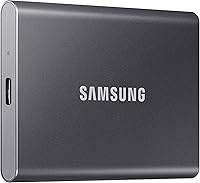
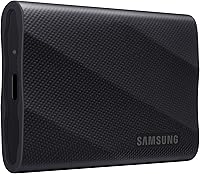
Samsung T7 Shield vs Samsung T9: Which Is Better? (November 2026)
Choose the Samsung T7 Shield for most people because it combines 1TB capacity, useful rugged protection and 1,050 MB/s speed. Choose the Samsung T9 when USB 3.2 Gen 2x2 hardware can use its higher 2,000 MB/s speed.
On this page (11 sections)
- Samsung T7 Shield vs Samsung T9: the quick verdict
- Samsung T7 Shield and T9 side by side
- Which SSD is faster for large files?
- Which drive is better for travel and outdoor use?
- Does the T9's speed matter for your computer?
- Which portable SSD works with more devices?
- Which SSD handles sustained work better?
- Which drive offers the stronger security features?
- Who should buy the Samsung T7 Shield?
- Who should buy the Samsung T9?
- Samsung T7 Shield vs Samsung T9: final choice
Choose the Samsung T7 Shield for most portable storage needs because its 1TB capacity, IP65 rating and up to 1,050 MB/s speed cover more daily situations. The Samsung T9 wins for high-speed transfers when your computer or other host supports USB 3.2 Gen 2x2.
Both are Samsung portable solid-state drives with 1TB of storage. This Samsung T7 Shield vs Samsung T9 comparison focuses on speed, durability, compatibility, security, setup and the kind of work each drive suits.
The T7 Shield earns the higher score because it offers a more useful balance for travel, shared devices and outdoor work. The T9 is the specialist choice for moving large files quickly through compatible hardware.


Samsung T7 Shield vs Samsung T9: the quick verdict
The Samsung T7 Shield is the better overall pick, while the Samsung T9 is the better speed pick. The T7 Shield reaches up to 1,050 MB/s through USB 3.2 Gen 2 and adds IP65 water and dust resistance plus drop resistance up to 9.8 feet.
The T9 reaches up to 2,000 MB/s through USB 3.2 Gen 2x2. That gap matters when you regularly move large video files, project folders or other heavy data and have a host connection that can use the faster standard.
Capacity does not separate them. Each drive has 1TB, so the choice is about how quickly you work and how much physical protection you want around a portable drive.
For a broader look at the first drive, read our Samsung T7 Shield review. For the faster model, the Samsung T9 review covers its place in a portable SSD setup.
Samsung T7 Shield and T9 side by side
The T7 Shield focuses on protection and broad portable use; the T9 focuses on peak transfer speed and thermal control. Both are black, portable Samsung SSDs with 1TB capacity and hardware-based security features.
| Feature | Samsung T7 Shield Portable SSD 1TB | Samsung T9 Portable SSD 1TB |
|---|---|---|
| Capacity | 1TB | 1TB |
| Top transfer speed | Up to 1,050 MB/s | Up to 2,000 MB/s |
| USB standard | USB 3.2 Gen 2 | USB 3.2 Gen 2x2 |
| Protection focus | IP65 water and dust resistance, drop resistance up to 9.8 feet | Rugged durability enduring up to 9.8 feet drop |
| Thermal feature | Dynamic Thermal Guard | Dynamic Thermal Guard |
| Security | Hardware encryption | AES 256-bit hardware encryption |
| Compatible devices | PC, Mac, Android devices, gaming consoles and more | PC, Mac, tablet, iPhone 15/16 and selected consoles |
The names describe the main difference clearly. The T7 Shield is built around protection in a portable environment, while the T9 puts its headline number on speed.
The product data also labels the T9 interface as USB 3.0 in one field, while its title and speed description identify USB 3.2 Gen 2x2. For the 2,000 MB/s figure, the USB 3.2 Gen 2x2 requirement is the useful point.
Which SSD is faster for large files?
The Samsung T9 wins speed because its maximum transfer rate is up to 2,000 MB/s, compared with up to 1,050 MB/s for the T7 Shield. That difference is most useful during repeated transfers of large files.
A 1TB drive can hold a substantial working collection, but the time spent moving that collection depends on more than capacity. The host port, cable, file sizes and transfer pattern all shape the result.
The T7 Shield uses USB 3.2 Gen 2 and reaches up to 1,050 MB/s read speed, with write speed up to 1,000 MB/s in the product description. The T9 uses USB 3.2 Gen 2x2 and lists up to 2,000 MB/s read and write speeds.
For a compatible desktop or PC, the T9 is the clear choice for speed-sensitive work. For mixed devices, the T7 Shield's lower peak still gives a fast portable SSD without making the higher standard the center of the decision.
Which drive is better for travel and outdoor use?
The Samsung T7 Shield is the better travel drive because it has an IP65 rating for water and dust resistance and drop resistance up to 9.8 feet. Those details directly address the bumps and weather exposure that portable storage can face.
IP65 describes controlled water and dust resistance, not permission to treat the drive like underwater equipment. Keep the ports and connection area handled carefully, and avoid exposing any storage device to conditions beyond its stated protection.
The T7 Shield also uses an outer elastomer design for added durability. Its protection gives it a clear advantage when the drive moves between a desk, camera bag, backpack and shared workspace.
The T9 also includes rugged durability described as enduring a drop of up to 9.8 feet. Its product data emphasizes this durability and Dynamic Thermal Guard, but the T7 Shield has the more detailed environmental protection specification.
Does the T9's speed matter for your computer?
The T9 is worth choosing for speed only when your host device and connection support USB 3.2 Gen 2x2. Otherwise, the drive's headline maximum cannot be the deciding factor.
A fast SSD connects to a system through a chain. The computer port, cable and drive standard all need to support the transfer path, and UASP mode must be enabled for the stated maximum speeds.
This makes the T9 a strong fit for a desktop or PC built around fast external storage. It also suits a workflow where large files move often enough that transfer time affects the workday.
The T7 Shield is easier to match to a wider range of devices because USB 3.2 Gen 2 is common across its stated compatibility list. Its performance still suits file storage, project transfers and direct editing when the host supports the required connection.
Which portable SSD works with more devices?
The T7 Shield has the broader stated compatibility range because it covers PC, Mac, Android devices, tablets, iPhone 15/16 and gaming consoles. The T9 covers PC, Mac, tablets, iPhone 15/16 and selected gaming consoles.
The T7 Shield lists Microsoft Xbox Series S, Xbox Series X, Nintendo Switch, Nintendo Switch OLED Model, Nintendo Switch Lite, PlayStation 5 and PlayStation 5 Slim among compatible console models.
The T9 lists Xbox Series S, Xbox Series X, PlayStation 4 and PlayStation 5. That makes it a strong console-adjacent option, but the T7 Shield names more console families.
Both drives support iPhone 15 Pro Res 4K at 60fps video, with the included SSD cable recommended for that use. If your storage moves between a phone, computer and console, list those devices first and choose the drive that fits the whole group.
Our Samsung T7 vs T7 Shield comparison is useful if you are also deciding whether the Shield's protection is worth choosing over the standard T7.
Which SSD handles sustained work better?
The Samsung T9 is the better choice for long, demanding transfer sessions because Dynamic Thermal Guard is paired with its high-speed design. The T7 Shield also has Dynamic Thermal Guard, so both drives include a named heat-control feature.
Thermal control matters when an SSD stays busy instead of handling one short copy. A drive that moves large files repeatedly needs a host connection, cable and workflow that match the drive's performance target.
The T9's product description says its thermal solution controls heat to keep the SSD at ideal temperatures during heavy use. That makes it a natural fit for creators moving large project files or using a portable drive as active workspace storage.
The T7 Shield's heat-control feature supports its broader role. It combines Dynamic Thermal Guard with USB 3.2 Gen 2 speed, environmental resistance and a portable 1TB format.
Which drive offers the stronger security features?
Both drives include hardware-based encryption, with the T9 naming AES 256-bit hardware encryption specifically. The T7 Shield lists hardware encryption and adds Samsung Magician software for drive health monitoring, updates and optimization tools.
The T9 also works with Samsung Magician software for firmware updates, extra encryption and continual drive-health monitoring. This gives both products a software path for keeping the drive current and checking its condition.
Encryption is most useful when the drive contains work files, personal documents or other data that should not be readable if the physical drive is separated from its owner. Set up the security features before the drive becomes part of your main file routine.
Keep a separate backup of files that matter. A portable SSD is convenient storage, but one drive should not be the only copy of important work.
For a wider storage decision, our guide to SSD vs HDD for backup explains why drive type and backup role should be considered together.
Who should buy the Samsung T7 Shield?
Buy the Samsung T7 Shield if you want one portable 1TB SSD for travel, mixed devices and everyday file work. Its 9.1 score reflects the combination of speed, IP65 protection, drop resistance, encryption and broad compatibility.
It suits a laptop bag, shared work area or mobile workflow where the drive can encounter dust, light water exposure or accidental drops. The 3.39 x 2.24 x 0.49 inch dimensions also make its portable form easy to plan around in a small storage pouch.
The T7 Shield works especially well for people who want a simple choice without building the decision around the fastest available USB connection. USB 3.2 Gen 2 still supports up to 1,050 MB/s, which is a strong ceiling for many everyday file tasks.
Choose it for console storage when your device appears in its compatibility list. It is also the better match for iPhone 15 Pro Res 4K at 60fps video when rugged protection matters alongside the required cable connection.
Who should buy the Samsung T9?
Buy the Samsung T9 if your computer supports USB 3.2 Gen 2x2 and large transfers are a regular part of your work. Its 8.6 score reflects its outstanding speed focus, while the lower score than the T7 Shield reflects a narrower reason to choose it.
The T9 suits a desktop, PC or compatible setup where transferring heavy files quickly saves time. Its up to 2,000 MB/s speed gives it the clear edge for speed-sensitive workflows.
It also includes Dynamic Thermal Guard, AES 256-bit hardware encryption and compatibility with PC, Mac, tablets, iPhone 15/16 and selected consoles. The drive's stated weight is 4.32 ounces, which is useful when you are planning a portable kit around it.
Choose the T9 when the full connection path can use USB 3.2 Gen 2x2. If your devices mainly use slower connections, the T7 Shield's protection and wider stated device range create more value.
Samsung T7 Shield vs Samsung T9: final choice
The Samsung T7 Shield is the winner for most people because it balances 1TB capacity, up to 1,050 MB/s speed, IP65 protection and broad compatibility. Pick the Samsung T9 when up to 2,000 MB/s transfers through USB 3.2 Gen 2x2 are the main reason you are buying a portable SSD.
Choose the T7 Shield for travel, mixed devices, consoles, phones and work areas where dust, water exposure and drops are real concerns. Its 9.1 score makes it the clear overall pick in this Samsung T7 Shield vs Samsung T9 matchup.
Choose the T9 for a compatible high-speed desktop or PC workflow. It gives up some of the T7 Shield's protection emphasis, but its 2,000 MB/s ceiling is the better answer when large transfers happen often.
Both have 1TB, hardware-based security and Samsung Magician support. Start with your host connection and daily surroundings, then select the T7 Shield for the broader fit or the T9 for speed-first storage.
Frequently asked questions
Are the Samsung T7 Shield and T9 both 1TB?
Yes. Both drives in this comparison have 1TB of digital storage capacity.
That makes speed, protection, host support and your transfer habits the main reasons to choose one over the other.
Can the Samsung T9 reach 2,000 MB/s on every computer?
No. The T9 reaches up to 2,000 MB/s when the host device and connection support USB 3.2 Gen 2x2 and UASP mode.
A slower port or cable changes the practical transfer speed.
Is the Samsung T7 Shield waterproof?
The T7 Shield has an IP65 rating for water and dust resistance under controlled test conditions. That rating supports resistance to water flow and active dust exposure, but it is not a reason to submerge the drive.
Which drive is better for an iPhone 15 Pro?
Both products support iPhone 15 Pro Res 4K at 60fps video and include an SSD cable recommendation. Choose the T7 Shield for its lower score and stronger stated outdoor protection, or the T9 when compatible transfer speed matters more.